Tanks
A Tank is a vessel that can contain any quantity which we want to represent in units, such as kgs, tonnes etc., in particular liquids and gases. It is similar to a Queue in that it represents a storage area, which is passive. However, Queues can only can only contain discrete (whole number) quantities of material and simulate each item separately. In a Tank all the content is assumed to be the same, and to be measured in a continuous quantity - so the Tank can operate much more quickly than a Queue. They can be very functional if you are mixing base products to form a compound, and in cases when the particle size required for accurately meeting the process analysis is very small.
Create flow between Tanks using Pipes. You can create a Pipe by connecting two Tanks, using the routing arrows.
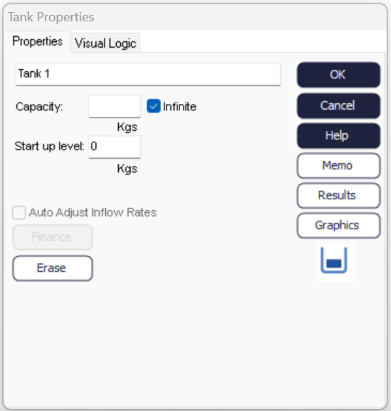
When double-clicking on a Tank, you can change its Properties.
Tank Properties
- Capacity
- Tanks can contain any positive quantity. To limit their maximum capacity set a number in the capacity field.
- Start up Level
- To start the simulation with a specific quantity in the Tank, set a start up level.
- Auto Adjust Inflow Rates
- Tanks can automatically adjust their inflow Pipes to maintain a constant level. Use these with Constrained Pipes to turn Tanks into control nodes.
Tank's Visual Logic tab
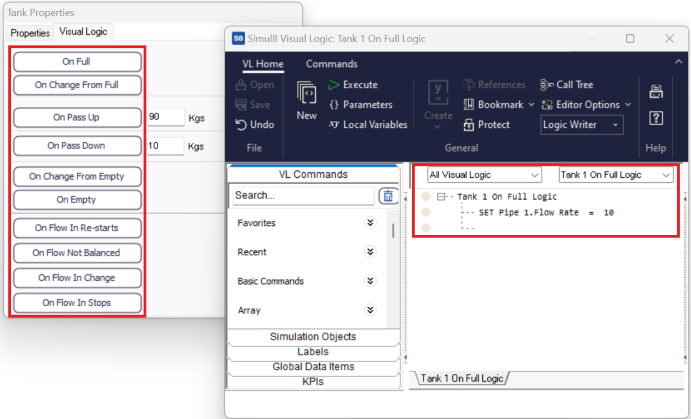
You can control many aspects of your simulation based on the state a Tan' level is at, using Visual Logic.
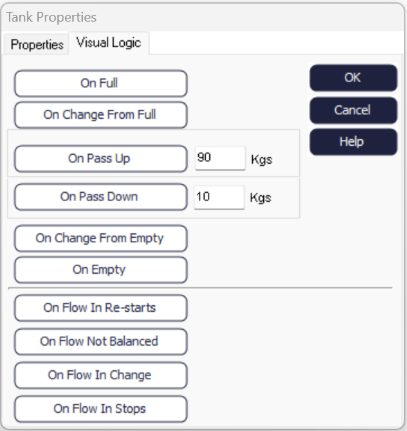
- On Full
- When the Tank's level reaches its Capacity.
- On Change From Full
- When the Tank's level falls below Capacity.
- On Pass Up
- When the Tank's level rises through the specified level.
- On Pass Down
- When the Tank's level falls through the specified level.
- On Change From Empty
- When the Tank's level rises above 0.
- On Empty
- When the Tank's level is 0.
- On Flow In Re-Starts
- When flow from the Pipe to the Tank restarts.
- On Flow In Change
- For any change to the flow into the Tank (pause or restart or change in level).
- On Flow In Stops
- When flow from the Pipe to the Tank is paused.
Sometimes, you may need to change the flow rate of the Pipe connecting the Tanks, based on a Tan' state, in order to control the flow of materials. That way, you ensure that you are releasing the right quantity of materials, and therefore obtaining the right mix in the next Tank. You can do that dynamically using the following Visual Logic command at a specified trigger point.