Process Oven
A Process Simulation Object is like an oven baking cookies but it can be used for many other purposes. In traditional Simul8 terms it can be compared to both an Activity and a Conveyor. However, like Tanks and Pipes, it handles continuous quantities of material rather than discrete units (whole numbers).
The Process objects is available from the Advanced Object tab on the Simulation Drawing Panel.
Material enters at the start of the process and, after some specified delay, leaves at the end (or exit). If we start to feed a process at the rate of 5 KGs per minute and the process is 20 meters long and runs at 10 meters per minute, then material will start to emerge from the exit in 2 minutes time, at the rate of 5KGs per minute. If we then slow the input to 2KGs per minute, in another two minutes time the output will also slow to 2KGs per minute.
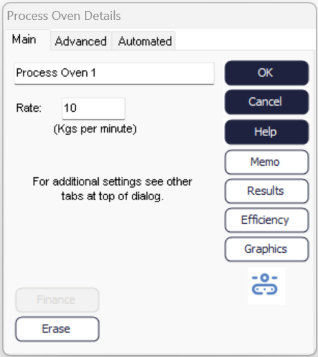
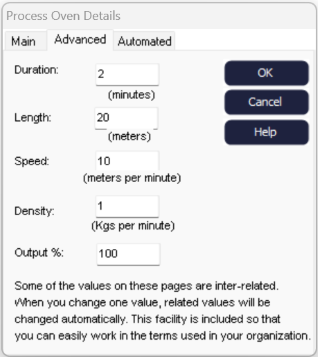
The Output % field allows conversion of input rate by a loss or gain factor.
Duration, Speed and Length are all related. Density is related to Speed and Rate (on the Main tab)
All the terms are provided because its has been found to be the best way to make the Process Object easy to use in a wide variety of situations.
The Automated Tab provides a way to override Simul8's handling of certain advanced features.
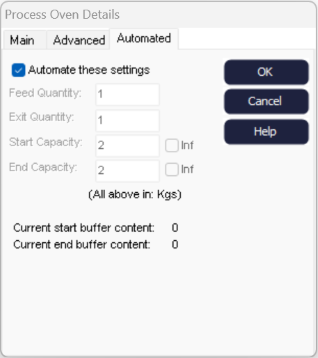
- Automate:
- All the settings on this tab will be adjusted by Simul8 as appropriate for the level of detail implied by settings on other tabs in the Process Object.
- Feed and Exit Quantity:
- When the object interfaces to another object in Simul8 these are the smallest quantities that Simul8 will consider transferring between objects.
- Start and End Capacity:
- When the object interfaces to another object in Simul8 these are the buffers that Simul8 introduces so that the process will not be falsely stopped because the other object can only handle discrete items. They are also used to increase Simul8 run speed by increasing the required interval of time between updating process object states.
