Pipes
A Pipe is like a standard Simul8 routing arrow between Tanks. It's created by linking two Tanks. Yet, Pipes differ from routing arrows because they are powerful in how they control flows. You can edit their Properties by double-clicking on them and delete them in exactly the same way as you would do for a routing arrow.
When you double-click on a Pipe, the following window appears.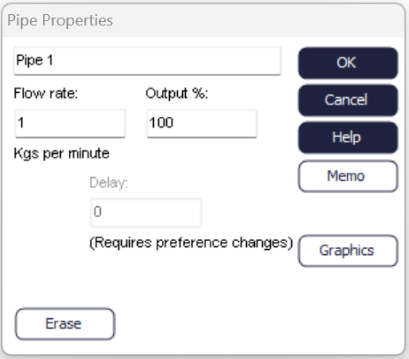
Pipe Properties
- Flow rate
- The maximum volume of material that can pass through the Pipe in at a time unit.
- Output
- Moderates the volume of material that can pass through the Pipe.
- Delay
- Delays the time materials spend in the Pipe. This option is enabled when checking "Use old (manual) Tank and Pipe algorithm (supports Pipe delays)" under File>Preferences>Continuous. It is recommended only for backwards compatibility, if you're on a version older than 2005. Newer versions handle cascading Pipe flow changes more automatically but cannot support delay inside the Pipes. Select the option best for your simulation needs.
We should highlight that Pipes control both flow and delay. In traditional Simul8 terms, this makes them similar to Activities (with the Tanks being like Queues). (See also the link on features:tanks_pipes below before you consider replacing all your Activities with Pipes).
