Minitab Simul8® in Minitab Dashboards
Import a simulation
- From the Minitab Dashboards menu, select Minitab Simul8
 pane and then select Import Simulation. By default, the dashboard uploads the required simulation results data,
generates a default dashboard that includes total throughput, KPIs,
utilization, and bottlenecks. To import a simulation and start with a blank
dashboard, clear Add dashboard assets automatically.
pane and then select Import Simulation. By default, the dashboard uploads the required simulation results data,
generates a default dashboard that includes total throughput, KPIs,
utilization, and bottlenecks. To import a simulation and start with a blank
dashboard, clear Add dashboard assets automatically. - Browse to and select the simulation you want to import. A dashboard can contain only one simulation at a time.
If the simulation includes global variables or data for pie charts, histograms, or time series charts, those outputs are also imported and available as data sources for dashboard assets. For more information about other dashboard assets, go to Data Visualizations.
Output Sheets and Live Input Sheets
- Output Sheets
- The data from these sheets is available to use in dashboard assets.
- Live Input Sheets
-
If your simulation contains links to data tables stored in Minitab Connect, the dashboard converts these links to data connections. These connections are available from the Data Connections pane.
If the data table updates in Connect, you can refresh the data connection to get the latest prepared data in the dashboard without having to open Simul8. Dashboard assets use the refreshed data immediately, but the simulation does not rerun automatically after the refresh. To update simulation results, run the simulation again. Minitab Connect reads and prepares data from databases and other sources for use in your dashboard. For more information on how to set up a connection between Simul8 and Minitab Connect, go to Minitab Connect Integration.
If you have Simul8 Internal spreadsheets that are not linked to Connect, you can map them to existing dashboard data connections, such as a data connection created from a Microsoft Excel® file. The dashboard uses this data to replace the data in the Internal spreadsheet. When the data changes, refresh the data connection to run the simulation with the latest data. You do not need to import the simulation again. The mapping is saved with the dashboard, but the dashboard does not save or change the imported Simul8 file.
Progress
Shows the status of a managed simulation run. The progress asset uses the current simulation time and the configured run end time to show how much of the run is complete. The simulation clock represents the equivalent time in the real system.
Toggle
Note
You can only use a toggle on global variables that do not have an "on reset" value.
Use Bound Variable to select the Simul8 global variable that the toggle changes. Then specify the values to write When ON and When OFF. When a user switches the toggle, the dashboard writes the corresponding value to the Bound Variable. The toggle's checked state reflects the current value from the Simul8 runtime. The toggle is disabled while a run or trial is active.
Use the Appearance options to show a label and description. You can also set the Vertical Alignment of the toggle to top, middle, or bottom.
Input
Note
You cannot edit a global variable with an "on reset" value.
- Text
- Displays a text entry field. The dashboard writes the value to the Bound Variable when the user leaves the field or presses Enter.
- Number
- Displays a numeric entry field. You can specify the minimum, maximum, default value, and whether to only allow integers. The dashboard validates the value and then writes it to the Bound Variable.
- Selection
- Displays a list of options. Enter a Label and Value for each option in the list. When you select an option, the dashboard writes the option Value to the Bound Variable.
Use the Appearance options to show a label and optional description. If you do not enter a label, the input uses the source variable name.
Sheet
Display and edit values from a selected Simul8 spreadsheet. A Simul8 spreadsheet is a Global Data Item that can contain text values, numeric values, or formulas. You can change values in a spreadsheet directly or with Visual Logic.
Use the Sheet option to select the Simul8 sheet to show in the asset. If you do not select a sheet, the asset shows an empty state.
Note
If you enter a value greater than 1, the dashboard formats all rows or columns up to and including that value as headers. For example, if Column Header Row is 2, the dashboard formats both rows 1 and 2 as column headers.
Double-click a cell to edit it. Edits only affect the spreadsheet on the dashboard; they do not affect the original Simul8 file that you imported. You cannot edit a sheet while a run or trial is active.
Share the dashboard
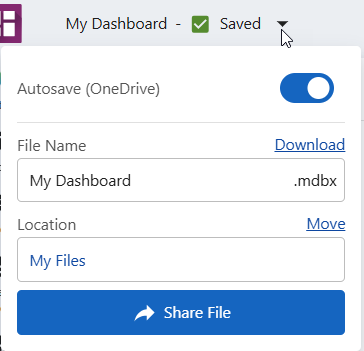
- Send an email
- Under Add people enter the email addresses of anyone you want to share the dashboard with, then under Permission select whether you want them to view or edit the dashboard. Select Send to send an email with access to the dashboard.
- Copy a link
- Select Copy Link. Anyone with access to the dashboard can use the link to view the dashboard.
