Calling an External DLL from Simul8
There are lots of ways to communicate between Simul8 and other applications. We make a DLL interface available for customers who want to use this method, but there are many easier methods to use. Calling an external dll requires an understanding of DLL and programming in a high level language. If you don't have this knowledge (and even if you do) you are probably better off using a direct link to Excel or a COM interface.
- If you have a large amount of logic written in a legacy system and you cannot recode this in Simul8's Visual Logic and this legacy system cannot use COM.
- You need a very large number of calls to the external procedure in a short space of time (even then, doing the work inside Simul8's Visual Logic would likely be faster).
Assuming, you really do need to use this feature then here is how:
This help file assumes you understand Simul8's Visual Logic (VL).
Overview
- You can place a call to an external DLL anywhere that you can use VL.
- Your DLL must have a specific name and be placed in a specific location to ensure Simul8 can find it.
- From this DLL you can call any other DLL (normal Windows naming and location rules apply)
- From this DLL you can also access any other Resources that can be accessed from a DLL (open databases, use COM, etc etc)
- The DLL has a text. This is the most general available and can be typecast into other forms depending on the features in the language you use.
- The text parameter is both passed to the DLL by Simul8 and read back when the DLL returns.
- This means data about the state of the simulation and/or different instructions can be passed to the DLL and also instructions and/or data can be passed back telling Simul8 what to do next.
- Your DLL can be created in any language that supports DLL creation
Detail and Example
- Create a Simul8 text Global Data Item (example: TextVar)
- Insert a Call DLL line in VL like this:
- Call Custom DLL TextVar
Here is a practical example. In this case we pass some data in a Simul8 spreadsheet to a custom DLL, apply some algorithm inside the DLL to decided what route to take, then use the returned information (with Label Routing) to send the Work Item to the correct route.
VL SECTION: Activity 1 Work Complete Logic
  'Build up a text string with all the information to pass to the DLL
  SET Textvar  =  MySheet[10,5]
  'Put commas between the items (because that's what my DLL expects)
  SET Textvar  =  Textvar+","
  SET Textvar  =  Textvar+MySheet[10,6]
  'Call my DLL
  Call Custom DLL    Textvar
  'Now we are back TextVar will contain information returned by the DLL
  '- in my case some text telling the Work Item where to go
  IF Textvar  =  "Use Express Route"
    SET My Route Label  =  1
  ELSE IF Textvar  =  "Use Cheap Route"
    SET My Route Label  =  2
ELSE
  'Something wrong
  Display Message    "The DLL Returned this: "+Textvar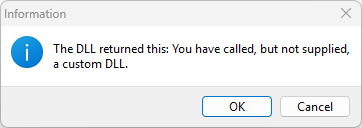
This is because your VL has successfully called and returned from a DLL, but it is the dummy DLL provided by Simul8 Corporation.
Create Your Own DLL
In your chosen external language:
Write your DLL in the language of your choice. Refer to the following example.
Rules (easily understood and implemented by DLL programmers):
- The DLL must be called s8extra.dll
- The DLL must be placed in the same folder as s8.exe. (Normally C:\Program Files\Simul8) (we suggest you rename the supplied s8extra.dll to s8extra.old, but if you need to get it back because you have overwritten it a back up copy is installed with Simul8. Copy s8extra.bak to s8extra.dll to restore the original from the backup.
- The DLL must export a procedure called s8external
- The s8external procedure must have a library index of 1
- The s8external procedure must have 2 parameters: TextInfo:pchar and MaxTextInfo:integer. MaxTextInfo is the largest number of bytes that Simul8 can accept back from the DLL in TextInfo.
Note
If Windows will not let you rename, replace or recompile s8extra.dll this is likely caused by s8extra.dll being in memory. Make sure you have closed all copies of Simul8. If necessary restart Windows.
library s8extra;

uses
  SysUtils,
  Classes,
  system;

{$R *.res}

procedure s8external(TextInfo:pchar;MaxTextInfo:integer); export;
//this is the one procedure that MUST be supplied

var
 myreturnstring,inputstring:string;
 commapos,ierror:integer;
 totalscore,newvalue:double;

begin
 inputstring := strpas(TextInfo);
 totalscore := 0;
 commapos := pos(‘,’,inputstring);//find a comma
 //for each parameter
 while commapos> 0 do
 begin
  val(copy(inputstring,1, commapos-1),newvalue,ierror);//convert to number
  if ierror <> 0 then newvalue := 0;
  //add them up
  totalscore := totalscore + newvalue;
  delete(inputstring,1,commapos);//remove uses parameter
  commapos := pos(‘,’,inputstring);//find another comma
 end;

 //get the last parameter
 val(copy(inputstring,1, commapos-1),newvalue,ierror);
 if ierror <> 0 then newvalue := 0;
 totalscore := totalscore + newvalue;

 //make route decision
 if totalscore> 123 then
 begin
  myreturnstring := ‘Use Express Route’;
 end
 else
 begin
  myreturnstring := ‘Use Cheap Route’;
 end;

 //return the result provided it fits in the available space
 if length(myreturnstring) <MaxTextInfo then strpcopy(TextInfo,myreturnstring);
end;

exports
 s8external index 1;

begin
end.
Example
To see more details, download Call_DLL_example.S8.
