Routing Out By Condition
The Work Item routing is determined by set of conditional statements that can reference any property within the simulation via the Formula Editor input. This makes for a very powerful feature that can route Work Items with a high level of flexibility.
Selecting the Routing Out By Condition method
To route a Work Item depending on its condition select By
Condition from the Discipline menu in the Routing
Out properties window (applicable at a Start Point, Activity or
Conveyor). By default, the Routing Out By Condition properties will appear. If you
wish to edit this information in the future, you can select
Detail next to the By Condition
radio button.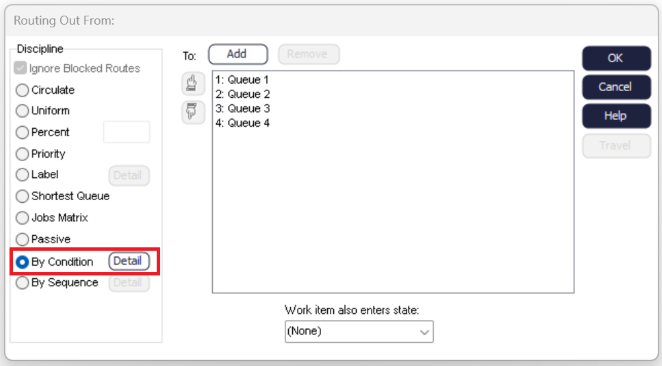
Setting the Properties
- CONTAINS - used to specify a list or range of values. Lists of values are separated with commas "," and ranges are signified with a dash "-". In this way it is possible to input multiple ranges as a list by separating the ranges with commas
- < Less Than
- < = Less Than or Equal To
- = Equal To
- > = Greater Than or Equal To
- > Greater Than
- <> Not Equal To
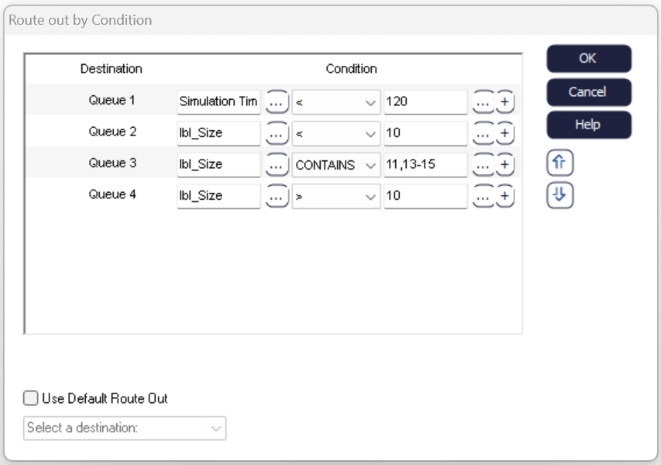
In the image above, the primary conditional statement checks whether the current Simulation Time is less than 120 minutes and routes Work Items to Queue 2 if true (NOTE - the time unit used here is set via the option in Clock Properties). Once this statement is not true upon routing out, the second conditional statement will be checked. Here we see that the remaining routes are based on the Work Item Label value for "lblSize". Queue 3 will take any Work Items with a size less than 10, Queue 4 will take sizes of 11, 13, 14 and 15 (utilizing the list and range inputs via the CONTAINS conditional operator) and Queue 5 will then take any other sizes greater than 10.
Adding Multiple Conditions
As part of 2018 the ability to add multiple conditions to each route was added. This allows complex IF statements to be developed by adding AND/OR statements to each condition, adding more power to this feature. To add an additional condition select the add button, located on the right hand side.
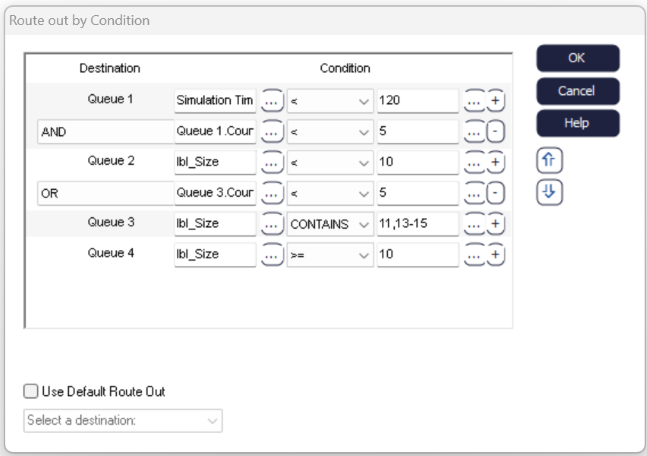
In the image above, the previous example has been expanded to include multiple conditions. The primary conditional statement now checks whether the current Simulation Time is less than 120 minutes AND if the number of Work Items in Queue 2 is less than 5. Only when both of these statement are true will Work Items be sent to Queue 2. Once this statement is not true upon routing out, the second conditional statement will be checked. Queue 3 will now be the chosen destination for Work Items when lblSize is less than 10 OR when the number of Work Items in Queue 2 is greater than 5.
Use Default Route Out allows any Work Items that do not match the above conditions to be given a destination. In the above example, there is no condition for a lblSize value of 10. Selecting Use Default Route Out will then allow for a destination to be chosen in this case.
