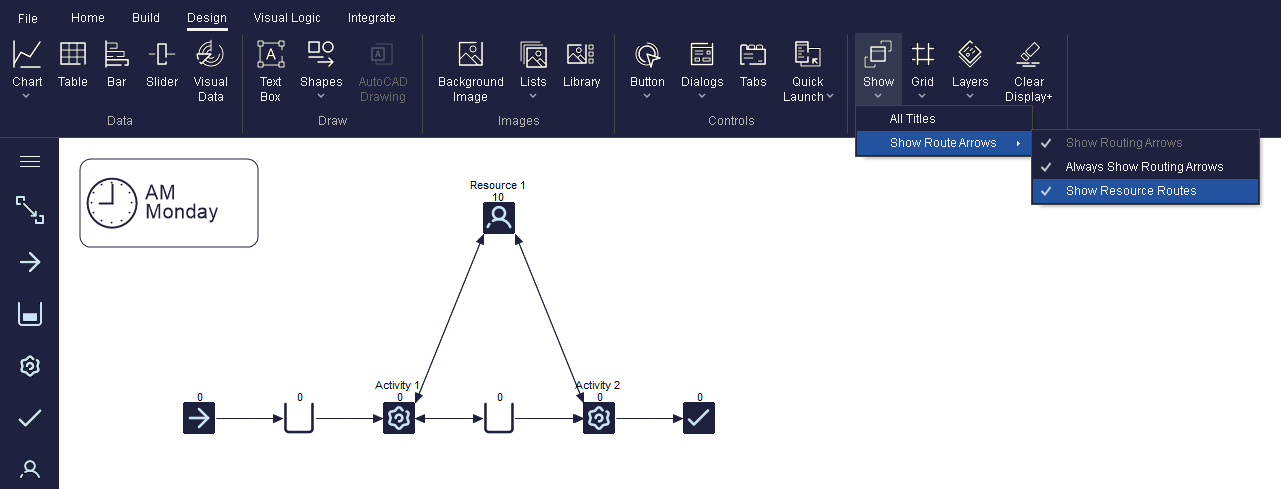
Resource Routing Arrows
Resources move from their initial position to Activities, between Activities (if using traveling Resources) and back to their initial position. By default, they move to the next location directly along a straight routing arrow which is hidden. However, we can display the Resource's routing arrow and modify it, to change the animation of the Work Item traveling.
To do that, first set the Resource's
Travel Times from/to Activities and their initial starting point through
it's Travel Time Matrix. To access the matrix, select the Resource and click on
Travel Matrix under the additional tab. Once
travel times are defined, we can show the Resource's routing arrow by toggling on "Show
Resource Routes". This is accessed by navigating to the Design Tab and choosing :