Resource Results

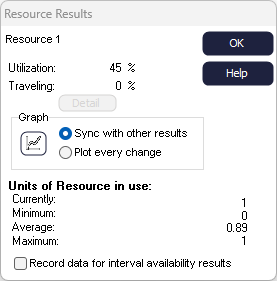
- Utilization
-
If there are 10 of a Resource and 10 are constantly in use then the utilization will be 100%.
If 10 are constantly in use and sometime 10 are available but shift patterns sometimes make 20 available then utilization will be less than 100%.
- Traveling Time
-
The percentage of available time that the members of the Resource were traveling between jobs. The Detailed button opens a matrix of the total amount of time (in time units) the Resource has spent taking each journey between Activities. This feature is very useful for highlighting routes that are frequently taken.
- Units of Resource in Use
-
This reports summary statistics for the number of Resources used during the simulation run.
- Time Graph
- Click the Time Graph
 button to see the number of Resource units in use over time.
Record Data for Interval Availability Results
The Visual Logic command Get Percent Utilization Over Interval can be used to extract the percentage utilization during a time interval, accounting for availability changes of a Resource. However as there is a speed impact on your simulation recording the information required to calculate this Simul8 does not collect this information by default.
Overtime Results
If you have run the simulation with Overtime enabled, you will have additional overtime results available.
