Activity Graphics
Use the Activity Graphics Dialog to configure the way each Activity is displayed.
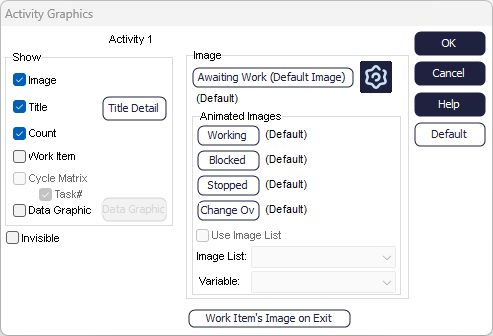
By default, Activities are displayed using one image. However you can animate them by choosing different ways to display the Activity when it is in different states.
To animate an Activity, select GRAPHICS in its dialog box and select a different image for each state that it can appear in. Optionally the Work Item that is currently at the Activity can be shown on the screen.
Show
- Image - Show the image for the Activity
- Title - Show the name of the Activity More on Object Titles
- Count - Show the number of Work Items currently being worked on by the Activity
- Work Item - Show the image of the Work Item currently being processed
- Data Graphic - Show customized information beside the Activity More on Data Graphics
- Image List - Change the image for the Activity depending on a variable value More on Image Lists
Default
Save the current display settings as the default display settings for all new Activities created.
Work Item's Image On Exit
Tells the Activity to change the image used to display a Work Item. The change is made as the Work Item's processing time at the Activity is completed.
This has priority over image changes that can be made using Label.
