Where Can You Use Visual Logic
To make structuring your logic easy, Visual Logic is accessed from the specific part of your Simul8 simulation where it will be applied. For example, if you want to trigger some Visual Logic when Work Items finish being worked on in an Activity then you would use On End Visual Logic, accessed by selecting the Activity then going to Events on the Additional tab.
The following graphic lists the different Visual Logic sections and the order they are executed.
Time Based Events
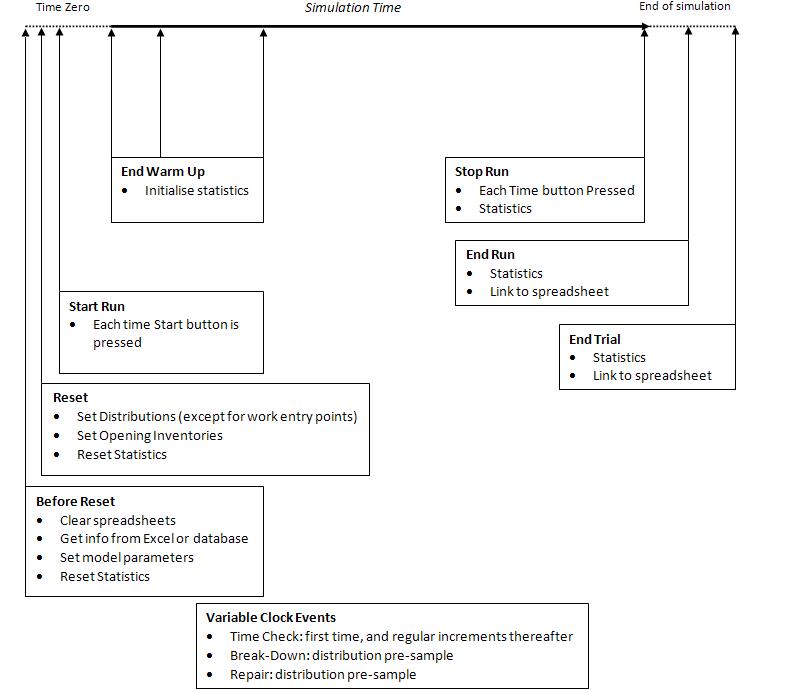
- Before Reset
-
When the Reset button is pressed but BEFORE Simul8's own reset logic is processed.
- On Reset
-
When the Reset button is pressed. Simul8's reset processing before this Visual Logic is obeyed.
- On End Run
-
When the simulation reaches the end of the run (results collection period).
- On End Trial
-
When the simulation has finished running all the runs in a trial.
- On Start Run
-
When the simulation is started using the Run button (at any clock time).
- On Stop Run
-
When the simulation is stopped using the Pause button (at any clock time).
- On Time Check
-
When the simulation is running and the clock reaches one of the time check intervals.
- End Warm Up
-
When the end of warm up time is complete (useful for special results calculations).
Simulation Object Visual Logic Events
- Activities
-
- Before Selecting
- Before a Work Item is chosen (please make sure that routing-in
is not set to passive):
Note
This can substantially slow down your simulation as it can be called multiple times, as it is triggered every time the Activity can take in Work Items.
- After Loading
- After a Work Item is loaded to the Activity.
- Label Actions
- When the Labels are being set.
- On End
- When a Work Item completes work.
- Before Exit
- When the Activity's route out is blocked.
- On Exit
- When a Work Item leaves the Activity.
- On State Change
- When the state of the Activity changes, for example, from Working to Waiting for work.
- On Breakdown
- When a breakdown occurs.
- On Start Repair
- After an Activity breaks down and the repair has started.
- On End Repair
- When the repair is completed.
See also Sequence of processing Activity Visual Logic
- Queues
-
- On Entry
- When a Work Item enters the Queue.
- On Exit
- When a Work Item exits the Queue.
- Expire
- When a Work Item expires.
- Conveyors
-
- Before Selecting
- Before the Work Item is chosen.
- After Loading
- After the Work Item is loaded onto the Conveyor.
- Label Actions
- When the Labels are being set.
- On Breakdown
- When a breakdown occurs.
- On End Repair
- When the repair is completed.
- Resources
-
- On Hold
- When the Resource is assigned to work.
- On Release
- When the Resource is released from work.
Other Events
- On Button Click
-
Executed whenever a user created button is clicked.
- On Simulation Open
-
Executed whenever your simulation file is opened.
- System Dynamics Time Slice
-
Executed each x simulation time units, where x is the value in the System Dynamics Time Slice. This can be used to continuously change rates of flow in Simul8 Process Objects.
