Get Resources Required
Gets the quantity of a Resource required at an Activity.
Parameters
- Activity- Activity where the Resource requirement is set
- Resource - Name of Resource that is required by the Activity
- Returned Minimum Quantity -Global Data Item to return minimum number of the Resource required at the Activity
- Returned Maximum Quantity - Global Data item to return maximum number of the Resource required at the Activity.
Comments
The Maximum and Minimum number available can also be found manually (see Resource Details dialog), and a higher number of the Maximum available reduces processing time. The Resource in question must already be assigned to the Activity, as this command does not make any new Resource assignments. 0 is a valid number to be returned (meaning that none of a particular Resource is required sometime).
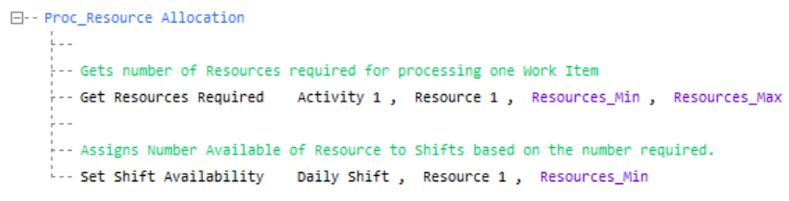
Annotated Example
In the example below, Get Resources required is used for storing the minimum number available in the numeric Global Data item Resources_Min, and the maximum available at Resources_Max. Then, while aiming to eliminate the Resources used, the number available during a Shift is set to Resources_Min using the Set Shift Availability command.