Set Shift Availability
Changes the number of Resources, Activities, Start Points or Conveyors available during a Shift
Parameters
- Shift - Name of the shift
- Simulation Object - Resource, Activity, Start Point or Conveyor
- Number Available - How many are available during this Shift? (1 is the maximum that can be used for Activities)
Comments
Shift availability can also be set through the Properties tab of Resources, the Additional tab of Start Points and Activities, and the Properties dialog of Conveyors, but this command can be useful when Shift availability is subject to change across Simulation Time.
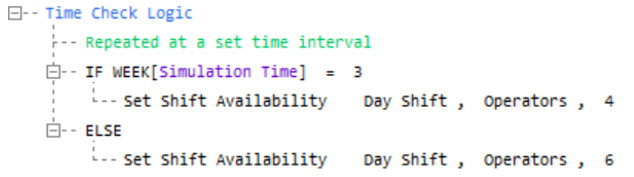
Annotated Example
This simulation runs for 4 weeks and there are 6 Operators available every week, except the 3rd week, when there are only 4 available. Time Check logic, which is triggered at a set interval, checks whether the Simulation is on the 3rd week or not, and allocates Operators to the Shift accordingly.