Display Message
Displays message text on screen with OK and cancel button. Simulation stops until OK clicked. If used at run time and cancel is pressed the simulation run will stop.
Parameters
Message Text
Comments
Useful for checking your logic or displaying special information to user.
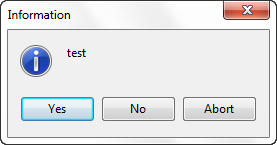
You can change what buttons are displayed on the message box by adding button codes after a colon. Valid button codes are: codesmbYes, mbNo, mbOK, mbCancel, mbAbort, mbRetry, mbIgnore, mbAll, mbNoToAll, mbYesToAll, mbHelp
Example
The Visual Logic below Display Message "test BUTTONS:mbYes,mbNo,mbAbort"
will display the message box below.