Example of Response Optimizer with the Predictive Analytics Module

A team of researchers wants to use data from an injection molding process to study settings for machines that maximize one type of strength of a plastic part. The variables include controls on the machines, different plastic formulas, and the injection molding machines. The team wants to identify process settings that produce parts with high strength while minimizing excess weight. These two responses are of special interest because one way to achieve high strength is to make denser, heavier parts. The analysis also includes a multinomial response variable that classifies parts as underfilled, nominal, or overfilled.

The engineers fit predictive models for both responses and use Response Optimizer to find predictor settings that balance the tradeoff between the two responses.

  1. Open the sample data, InjectionProcessMultipleResponses.MPX.
  2. Choose Predictive Analytics Module > Response Optimizer.
  3. Select Fill State in Worksheet 1. Then, select Random Forests® Multinomial Classification 1 as the model.
  4. Select Extra Weight in Worksheet 1. Then, select MARS® Regression 1 as the model.
  5. Select Strength in Worksheet 1. Then, select TreeNet® Regression 1 as the model.
  6. Select OK.

Verify the models

The results for the model diagram show that the performance of the models, the variable ranges, and the variable importances. The team agrees that the R-squared values that are high enough and that the misclassification rate is low enough. The team also agrees that the variables have their expected ranges. Because the results are what the team expected, the team proceeds to the optimization analysis.

Model Diagram: Fill State, Extra Weight, Strength

Model Performance

Response
Variable
ModelValidation Method
Fill StateRandom Forests® Multinomial Classification 1Out-of-Bag
Extra WeightMARS® Regression 15 Fold Cross Validation
StrengthTreeNet® Regression 15 Fold Cross Validation
Response
Variable
Performance
Fill StateMisclassification rate: 7.24%
Extra WeightR-squared: 87.97%
StrengthR-squared: 89.92%
All models are from the same worksheet: InjectionProcessMultipleResponsesWorksheet.MWX

Variable Ranges

VariableAverage
Importance
IDValuesResponses
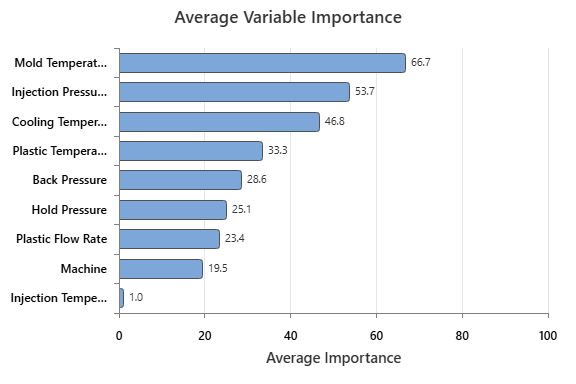
Mold Temperature66.66679[30.1, 1649.5]Extra Weight, Strength
Injection Pressure53.73471[75, 150]All
Cooling Temperature46.81832[25, 45]All
Plastic Temperature33.33335[200, 400]Fill State
Back Pressure28.59554[0.4, 0.7]Fill State
Hold Pressure25.11153[21, 48]Fill State, Extra Weight
Plastic Flow Rate23.35466[10, 50]Fill State
Machine19.525671, 2, 3, 4Extra Weight, Strength
Injection Temperature0.97398[85, 100]Extra Weight

Peform the optimization

  1. In the results, select Response Optimizer.
  2. In the Fill State row, select Nominal in Optimizer Classes. Select Maximize in Goal.
  3. In the Extra Weight row, select Minimize in Goal.
  4. In the Strength row, select Maximize in Goal.
  5. Select Desirability.
  6. In the Extra Weight row, specify the following values:
    Target Upper Weight Importance
    0 2 1 1
  7. In the Strength row, specify the following values:
    Lower Target Weight Importance
    300 1600 1 3
  8. Select OK in each dialog box.

Minitab uses the stored models to estimate the predictor settings that optimize the values of the response variables. The combined or composite desirability of these responses is approximately 0.8, which indicates that the solution did not meet the target for at least 1 response.

The Variable Ranges table includes the average importance of the variables across the models in the optimization. In these data, Mold Temperature is the most important variable. The variables are in the table in order of average importance, so Mold Temperature is at the top.

Response Optimization: Fill State, Extra Weight, Strength

Parameters

ResponseModelGoalOptimizer
Class
LowerTarget
Fill StateRandom Forests® Multinomial Classification 1MaximumNominal01
Extra WeightMARS® Regression 1Minimum 00
StrengthTreeNet® Regression 1Maximum 3001600
ResponseUpperWeightImportance
Fill State111
Extra Weight211
Strength160013

Variable Ranges

VariableAverage
Importance
IDConstraintValuesMissing
Values
Allowed
Mold Temperature66.66679No constraints[30.1, 1649.5]No
Injection Pressure53.73471No constraints[75, 150]No
Cooling Temperature46.81832No constraints[25, 45]No
Plastic Temperature33.33335No constraints[200, 400]No
Back Pressure28.59554No constraints[0.4, 0.7]No
Hold Pressure25.11153No constraints[21, 48]No
Plastic Flow Rate23.35466No constraints[10, 50]No
Machine19.52567No constraints1, 2, 3, 4No
Injection Temperature0.97398No constraints[85, 100]No
VariableResponses
Mold TemperatureExtra Weight, Strength
Injection PressureAll
Cooling TemperatureAll
Plastic TemperatureFill State
Back PressureFill State
Hold PressureFill State, Extra Weight
Plastic Flow RateFill State
MachineExtra Weight, Strength
Injection TemperatureExtra Weight

Solution

SolutionComposite
Desirability
Fill State
Individual
Desirability
Fill State
Prediction
Fill
State(Nominal)
Prob.
Fill
State(Overfill)
Prob.
10.8078840.687092Nominal0.6870920.236701
SolutionFill
State(Underfill)
Prob.
Extra Weight
Individual
Desirability
Extra Weight
Prediction
Strength
Individual
Desirability
Strength
Prediction
Mold
Temperature
10.07620620.5105520.9788960.9936431591.74532.008
SolutionInjection
Pressure
Cooling
Temperature
Plastic
Temperature
Back
Pressure
Hold
Pressure
Plastic
Flow Rate
Machine
1121.60040.7931383.2970.40093036.730647.11394
SolutionInjection
Temperature
193.6917

Multiple Response Prediction

VariableSetting
Mold Temperature532.008
Injection Pressure121.6
Cooling Temperature40.7931
Plastic Temperature383.297
Back Pressure0.40093
Hold Pressure36.7306
Plastic Flow Rate47.1139
Machine4
Injection Temperature93.6917

Predictions

ResponsePredictionPredicted Probability
Fill StateNominalLevelProbability
  Nominal*0.687092
  Overfill0.236701
  Underfill0.0762062
Extra Weight0.978896  
Strength1591.74  
* denotes optimizer classes

Desirability

ResponseIndividual
Desirability
Fill State0.687092
Extra Weight0.510552
Strength0.993643
Composite
Desirability
0.807884
Worst: 0.0, Best: 1.0

Examine the optimization plot

The optimization plot shows that an increase in Mold Temperature increases the desirability of Strength. An increase in Mold Temperature decreases the desirability of Extra Weight. Because the specifications for the optimization say that Strength is the most important , the optimization finds a solution that has an individual desirability of almost 1 for Strength. The solution has high individual desirabilities for Extra Weight and for Fill State.

You can adjust the factor settings of this initial solution directly on the plot. Move the vertical bars to change the predictor settings and see how the individual desirability (d) of the responses and the composite desirability change.

Edit the optimization plot

More options for the display of the optimization plot are available in the Graph Options.
  1. Select the optimization plot.
  2. Open the graph menu from the top-right corner of the optimization plot.
  3. Select Graph Options.
  4. In the pane, expand Options.
  5. Deselect Show individual desirability plots.
  6. Select Response variables.
  7. Deselect Fill State.
  8. Select OK.
In these data, Injection Pressure has two levels. For the tree-based models, the effect is a step pattern when you move the vertical bar. For the MARS® model for Extra Weight, the plot shows interpolation between the two levels.

The modified optimization plot highlights the need to select a mold temperature that balances an increase in extra weight with an increase in strength