Create and open Data Center projects
Sign-in requirements
- Microsoft OneDrive®
- Google DriveTM
Create a project
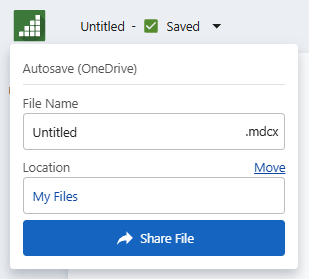
You can change file names and save locations. When you share an MDCX file, the linked files are not shared automatically. If you want recipients to have access to the linked data sources, you must share them separately.
- Sign in to supported repository.
- From the Solution Center home page, select Data Prep.
- Select Add Data.
- Browse to the file location, then select Open.
 or create other data prep steps from the Cleanup node
  .
For more information, go to Creating data pipelines.
.
For more information, go to Creating data pipelines.Important
Changes in the Data Center do not affect the original data source file.
Open a project
Open a Data Center project (.mdcx) from a repository. MDCX files open in a new tab of the Data Center.
- Upload the file to a supported repository.
- Open directly in Minitab Statistical Software or Minitab Dashboards.
Minitab Data Center files
The Minitab Data Center has 2 types of files that can be opened only in the Minitab Data Center.
Project file (MDCX)

The Minitab Data Center project file saves all the information about your cleaned data, including configured cleanup steps, connection information to the source file, and read options.
Steps file (MDCS)

The Minitab Data Center steps file saves all configured data prep steps. With this file, you can import data prep steps to other files that match your data schema. For more information, go to Example of importing/exporting data prep steps.
