SQL

What Is SQL?
SQL (Structured Query Language) is a language used to query data sources, normally databases such as Microsoft Access, but also including other SQL compatible packages, such as Microsoft Excel.
Simul8 adheres to the conventions set out in the SQL99 standards approved by the International Standards Organization (ISO).
Simul8 SQL is an extremely powerful way of reading and writing data to and from a data source. Simul8 can create new records, and update or delete existing ones.
Using an external data source reduces the memory overhead for Simul8, and allows access to huge volumes of "real" data, possibly stored on a separate machine or network drive.
You can set up the Database Connection directly in Simul8 or by using Microsoft ODBC Data Source on your PC.
Setting up the database source in Simul8
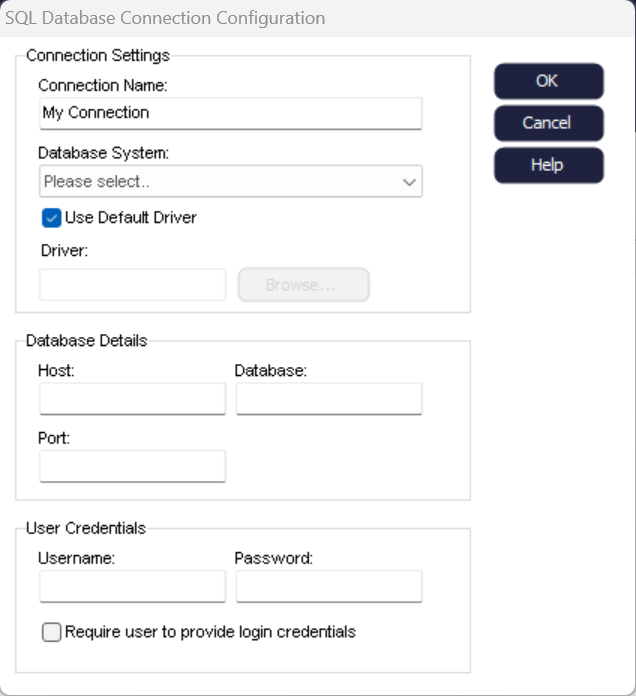
- Navigate to the Integrate Tab and choose .
- Click New Button.
- Optionally give the connection a name to identify which connection type is being created (E.g. MSSQL/PG).
- Select the database type from the dropdown.
- If you select the 'Use Default Driver' checkbox below the dropdown, Simul8 will use the default driver it has installed. Alternatively, leave this unchecked and enter the location of the driver you wish to use.
- Fill in the Database Details (Host, Database, Port).
- Fill in the User Credentials (Username, Password).
- Click OK Button.
By setting up the connection in Simul8, it will be saved as part of your simulation file. You can then send the file to someone else and all they need to do is enter their Username and Password to use the connection.
Setting up the database source on your PC
Simul8 SQL requires a valid "alias" to exist in the machine running Simul8. An Alias is commonly known as a Data Source Name.
- Open the Control Panel.
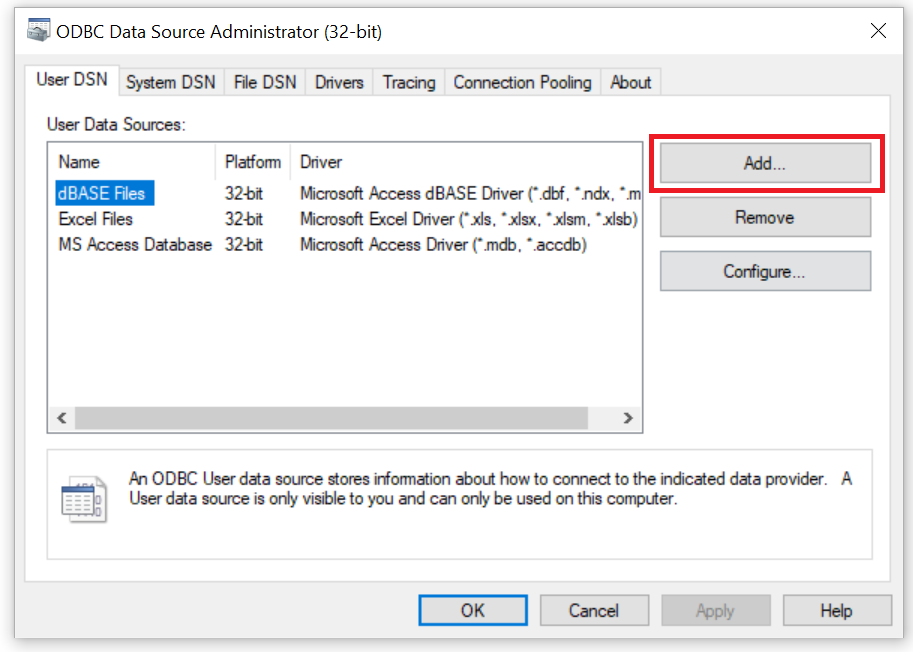
- Open Administrative Tools / Data Sources (ODBC).. You will need to select either the 32-bit or 64-bit ODBC version that matches the version of Simul8 you have (See File > Help > Architecture within Simul8 to confirm).
- On the ODBC Data Source Administrator interface, click on
"Add".
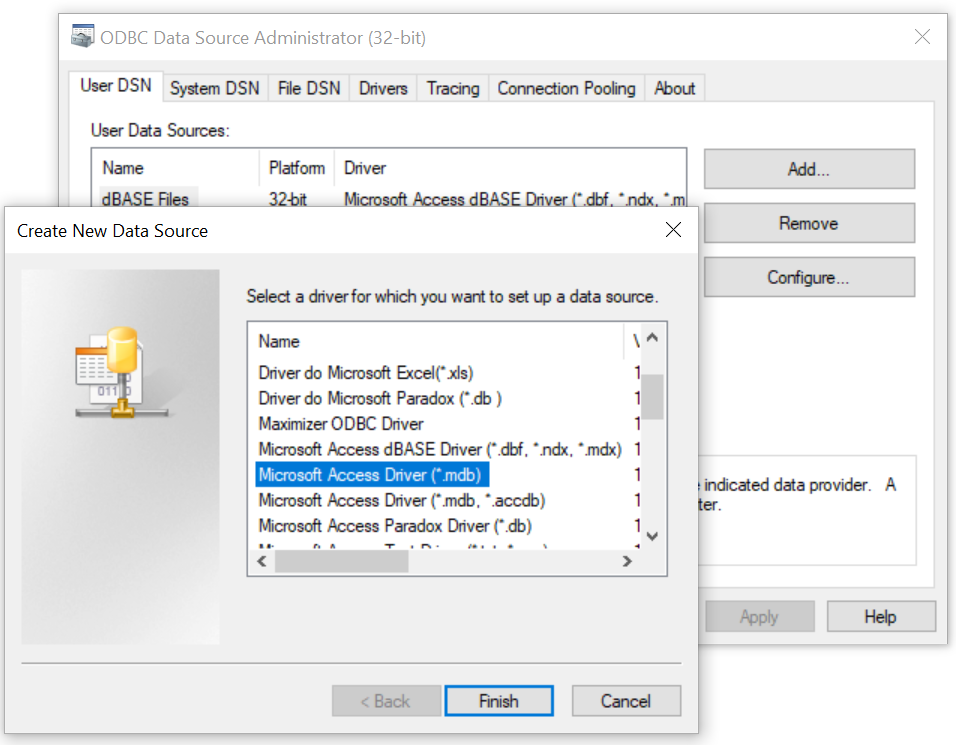
- Select the database type, e.g. Microsoft Access Driver(*.mdb), and click on
"Finish".
- In the Data Source Name box, give your Data Source a name that will later be
used in Simul8 to establish the connection. Click on "Select" to
choose the database that you want this reference to point (use the folder
list box).
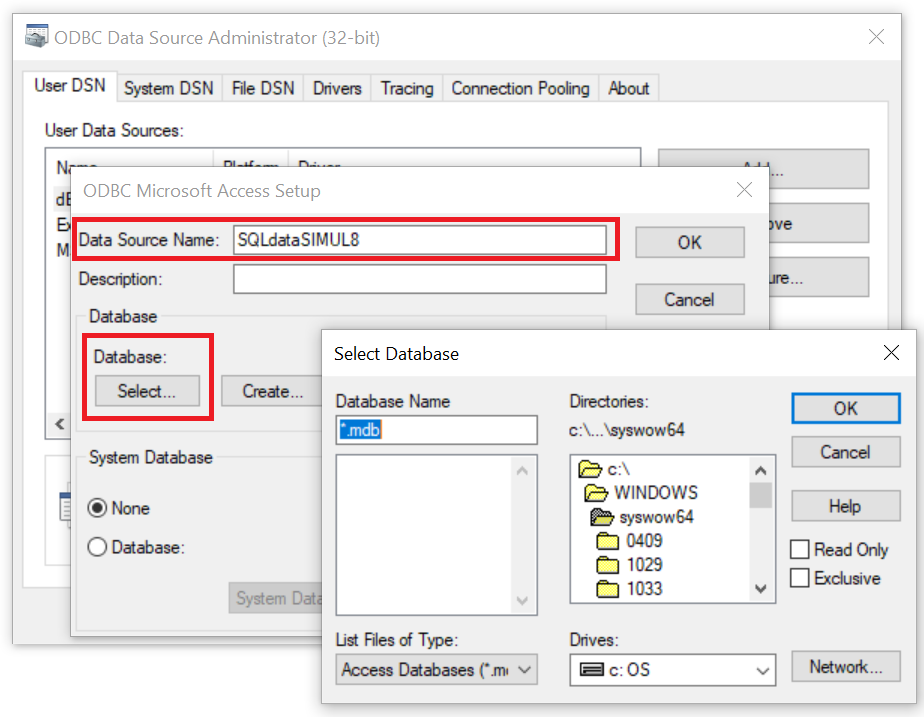
- Once the database has been selected, click "OK" on each of the dialog boxes to take you back to the main ODBC Data Source Administrator interface. You will now see that your new database source has been added to the list of available data sources. Click on "OK" and close the control panel.
You are now ready to activate the database import module in the simulation. See the Help file Setting Up an SQL Database Query in Simul8 for instructions on how to set up the SQL Connection within Simul8.
Updating an existing database source in 64-bit Simul8
If you use 64-bit Simul8 to open an SQL connection that was created in 32-bit, you will need to recreate the DSN from the 32-bit ODBC version in 64-bit ODBC. To do this, please follow the instructions listed above under "Setting up a new database source".
