In the web app, you can generate a brainstorm list
by typing items in the task pane, or you can use Minitab AI to generate brainstorm items directly on the diagram.
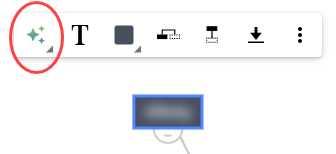
AI Options when a node is selected.
To quickly generate brainstorm ideas on the diagram, complete the
following steps.
- Select up to 10 nodes.
- Select AI Options
 ,
then select AI Quick Generate.
,
then select AI Quick Generate. - Review the results, then drag the new nodes to arrange
the diagram as needed.
For more information, go to Arrange the brainstorm diagram.
To generate more precise results, enter a custom prompt.
- Select up to 10 nodes.
- Select AI Options
,
then select AI Custom Prompt.
- In the Minitab AI dialog, enter details about the problem you want to solve. For example, potential causes for returning an online purchase.
- Select Generate.
- Review the results, then drag the new nodes to arrange the diagram as needed.
Important
AI technology may make mistakes. It is the user’s responsibility to ensure the output is accurate, appropriate, and meets your organization’s standards and requirements. For more information, see the Minitab Trust Center.
