Usage Log Expiry
Your Validation ID is updated every time you use Simul8 Desktop or Online. If Simul8
cannot connect to the server, you may see the following message. This could be because
you are not connected to the internet or a firewall is blocking the connection.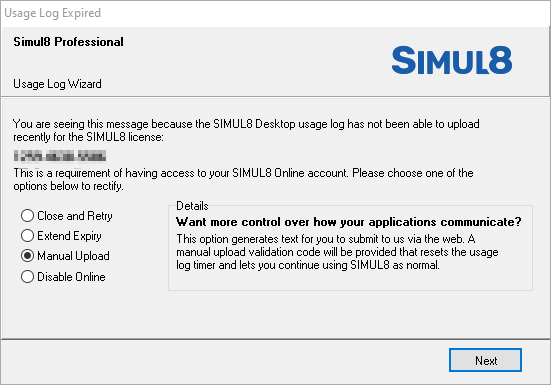
You have 4 options to choose from:
- Close and Retry - Select this option if you want Simul8 to immediately try to upload the usage log again.
- Extend Expiry - This will temporarily close the dialog, but it will not fix the issue. The message will return after a short while and you will not be able to select this option again.
- Manual Upload - Follow the instructions on the next page to manually upload the log to the server via a webpage.
- Disable Online - If you do not use Simul8 Online, you can disable it. This will stop the recording of the usage logs and allow you to continue using Simul8 Desktop without this message returning.
Re-activating Simul8 Online
If you have previously disabled Simul8 Online and now wish to re-activate it, open
Simul8 Desktop, go to File > Help and click on Re-enable Simul8 Online.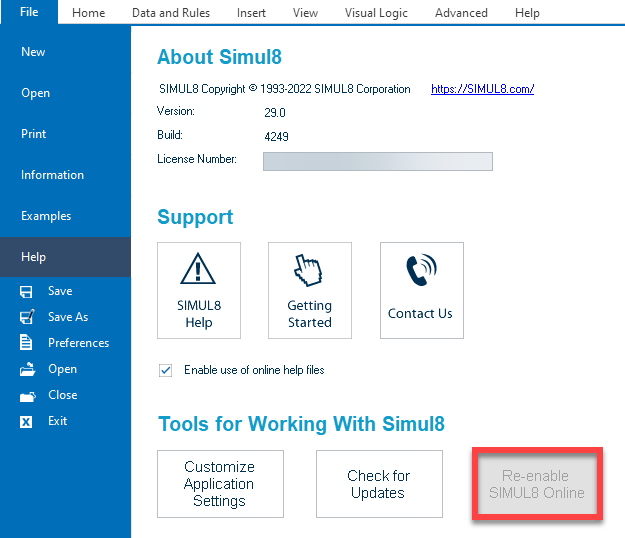
If you need any further help with this message or reactivating Simul8 Online, contact Minitab Technical Support and quote your license number (found under ).
