Object Contents
The Contents Dialog lets you look inside an Activity, Queue or Conveyor at the actual Work Items currently inside it. Click "Contents" in either the dialog box for the particular Object. The dialog shows the first 500 Work Items in the Object.
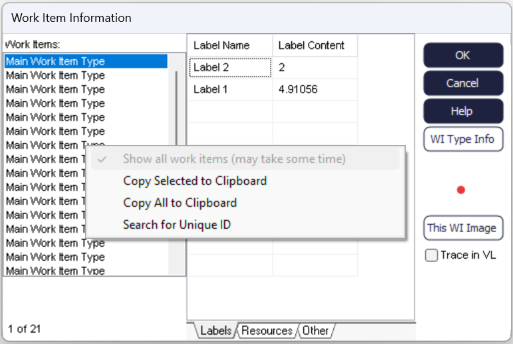
The displayed dialog box lists the Work Items (the names shown in the left hand list are the names of the Work Item type) and their Labels. The Work Items in a Queue are shown in sequence in the Queue. The top of the list is the Work Item at the head of the Queue (the next to be taken from the Queue).
Clicking on a Work Item and an Label name displays the values of the Label.
Right click in the Contents Dialog to copy the Contents information to the Clipboard. This allows precise analysis of the contents of an Object.
See also:
