Building a Basic Simulation
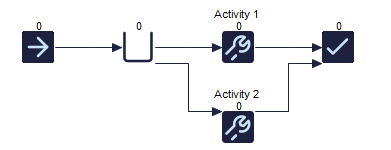
You build your simulation in Simul8 simply by drawing it on the screen.
Click the Start Point icon on the toolbar and drop the object somewhere on the screen.
Next click the Queue icon and do the same.
Then place an Activity on the screen using the Activity toolbar icon button (we will copy it in a moment to make a second one).
And finally create somewhere where work leaves the system with the End Point object.

You can run the simulation now if you like.

Now click the RUN button to run the simulation.
You will see "work" (red balls) moving between each simulation object you have created.
To stop the simulation click the RUN button again - it will stop automatically at the end of a week.
Video
Watch this video series to learn more about building a basic simulation.
