Routing via ML: Glass Bottle Sorting Example
In this example we will be using a machine learning algorithm to sort glass bottles on a bottling line conditional on some of their characteristics. These include their weight as well as condition, such as any cracks or bubbles present or not. Simul8 users will notice that this is essentially a Routing Out problem.
To follow along the example, download:
- glassdata.csv
- glassbottleexample.s8
- R or Python
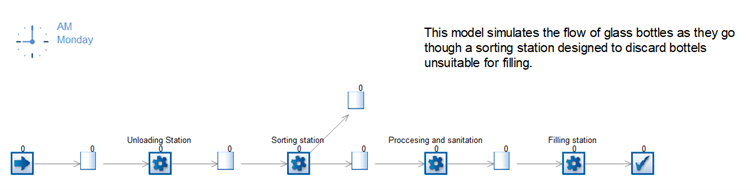
The model is a simple bottling line sorting out defected bottles before they get passed over to the filling stations. We show how to set this up in both R and Python in the two tutorials below.
Tutorial using R
Step 1
#Load in the data set and packages

library(dplyr)

library(randomForest)

#Change this directory to one where you have saved GlassData.csv

Data = read.csv('C:\\Users\\YourName \\Downloads
GlassData.csv')

#Train the linear regression algorithm

DefectRF ← randomForest(formula = Defect ~ ., data = Data)

# Save the model for the function needed in Simul8 use the code below

saveRDS(DefectRF,“GetDefectRF.rds”)# Add routing function to read though Simul8
# These need to be the same exact names as in the data set used to train the Machine Learning model
Routing = function(df){
Weight = (df[1,2])
Cracks = (df[2,2])
Bubbles = (df[3,2])
algorithm = readRDS(C:\\Users\\YourName\\Downloads\\GetDefectRF.rds')
data = data.frame(Weight, Cracks, Bubbles)
return(predict(algorithm,data))
}
#The file you will use for Simul8
saveRDS(Routing,“ DefectRFRouting.rds”)Note
The directory should be changed in both scripts to reflect where the .RDS and Excel files have been saved on your machine.
Step 2
Note
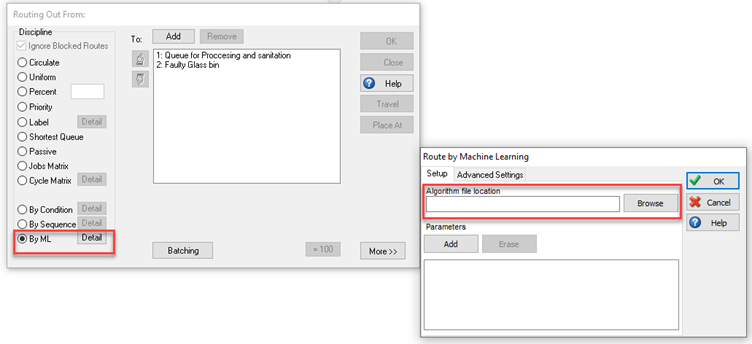
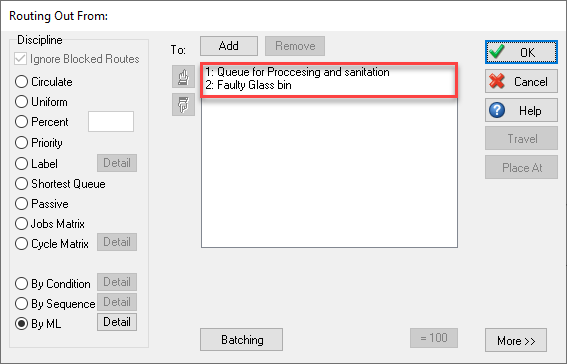
Make sure the correct value is connected to the correct bin (Queue). In this model a value of 2 should direct to the Faulty Glass bin Queue. You can use the Up and Down arrows to adjust this if necessary.
Reset the simulation and run. The routing out decision of the Sorting Station Activity will now use the machine learning algorithm.
Tutorial using Python
Step 1
#First, we need to load in the packages needed for random forest regression

import pandas as pd

from sklearn.ensemble import RandomForestClassifier

from sklearn.datasets import make_classification

import pickle

#Then we lock in the file path, when saving this as a py file by using the download section remove the “” as this is only needed in Jupyter Notebook

filepath = os.path.dirname(os.path.abspath(“file”))

# Read in the data and save as a name, in this case df for dataframe was used

df = pd.read_csv(filepath+r'\GlassData.csv')

features = [' Weight', 'Cracks', 'Bubbles']

X = df[features].values

y = df['Defect']

# Then make the model based on the x and y data arrays in this case a Random forest

clf = RandomForestClassifier(max_depth=2, random_state=0)

GlassRF = clf.fit(X, y)

# Save the algorithm as a sav file which we will use in the prediction function

filename = filepath+r'\ GlassRF.sav'

pickle.dump(GlassRF,open(filename,'wb'))import pickle
import os
def prediction(list1,list2):
filepath = os.path.dirname(os.path.abspath(file))
filename = filepath+r'\ GlassRF.sav'
loaded_model = pickle.load(open(filename,'rb'))
result = loaded_model.predict([list2])
return result[0]When using Python, the script used to predict the route value is shorter than in R. However, to work correctly it is necessary that Python is installed directly on the machine together with all necessary packages through the command prompt.
Step 2
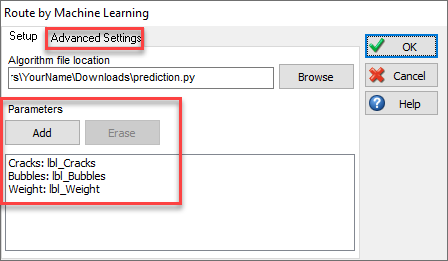
Click on Add and enter the parameters as in the R tutorial and click OK. After resetting, the Sorting Station Activity will now use the machine learning algorithm to make routing decisions.
If you are having trouble setting up Routing By ML, go to Machine Learning Troubleshooting.
