Loop On All Selected Object
Definition
Loop on all Selected Objects of Type Insert logic here to use during LOOP.
Parameters
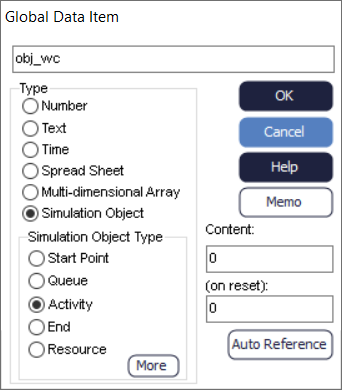
Object: an Object variable of type (e.g. obj_wc for Activity), this parameter is created in the Data Store in the Build tab as in the image below.
Comments
Can be called at any time, but will be skipped if no Objects are selected and/or no Objects of type are selected. A useful command for looping through Objects to set a Custom Property, or a property such as collect number.
- 'WORK CENTER' (Activity)
- 'STORAGE' (Queue)
- 'ENTRY' (Start Point)
- 'EXIT' (End Point)
- 'CONVEYOR'
- 'RESOURCE'
Example
LOOPOBJECTS all selected WORK CENTERS with obj_wc Attach Custom Property "Custom Property 1" , obj_wc SET obj_wc.CustomProperty["Custom Property 1"] = 1
This example will loop on all selected Activities, attach a Custom Property called "Custom Property 1" and set this Custom Property equal to 1.
