Visual Logic Command Browser
Overview
The Visual Logic Command Browser makes it easier for users to browse and add VL code to their simulations by categorizing Visual Logic commands into groups. All the Visual Logic commands are easily viewable at the same time as editing your Visual Logic code and the hover help feature provides a detailed explanation of the commands while browsing.
Exploring Interface
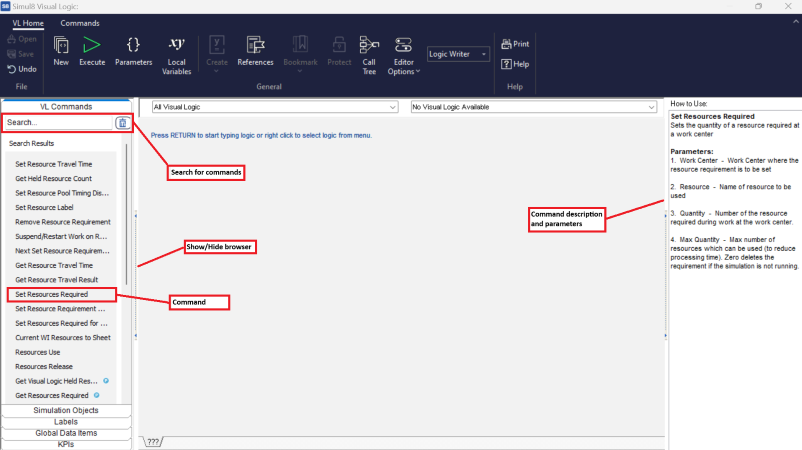
Figure 1: Visual Logic Command Browser
Collapse/Expand
A thin bar runs down the right hand side of the Command Browser. This bar can be used to collapse and expand the Command Browser. You may find it useful to collapse the Command Browser when you are debugging Visual Logic and want to maximize the amount of visible Visual Logic on screen.
There is also an option within the right click menu of the Command Browser that can set the Browser to be collapsed/expanded by default.
Adding Visual Logic to Editor
- Logic Builder
- The Visual Logic Command Builder will appear and will prompt you to enter the various parameters.
- Logic Writer (Predictor Disabled)
- The Visual Logic Command will be added to the editor.
- Logic Writer (Predictor Enabled)
- The Visual Logic Command will be added to the editor and the predictor box will be loaded with parameters of suitable type for the Command you selected.
- Developer (Predictor Disabled)
- The Visual Logic Command will be added to the editor and the Error List will appear underneath the editor.
- Developer (Predictor Enabled)
- The Visual Logic Command will be added to the editor and the predictor box will be loaded with parameters of suitable type for the Command you selected and the Error List will appear underneath the editor.
Searching for Commands
The search bar across the top of the Command Browser can be used to search all of the
available Visual Logic Commands. The Command Browser will automatically update its
results as you type. To return back to the original Visual Logic groupings click on
the button with the Eraser icon 
Recent Grouping
This is a special grouping of Visual Logic Commands that remembers the last five commands that have been used. It is not model specific and will be updated
Favorites Grouping
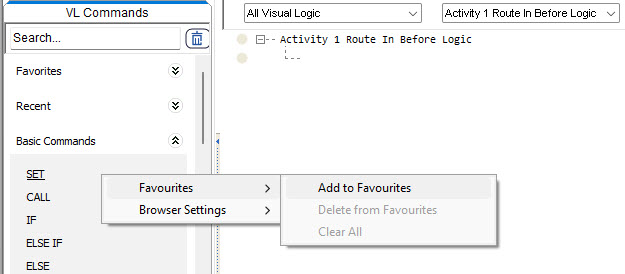
This is another special grouping that you have full control over. It is not simulation specific, so you can quickly access all your favorite Visual Logic Commands in all of your models.