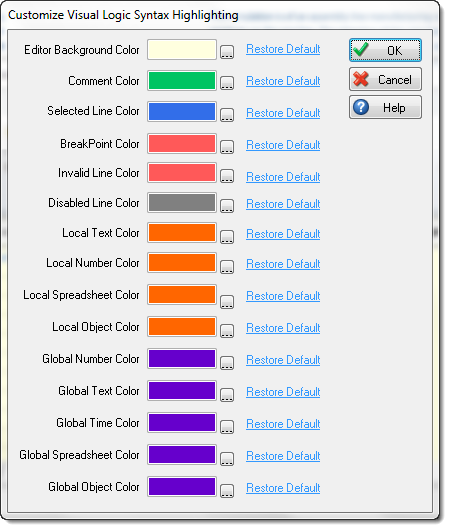
Syntax Highlighting
Visual Logic Syntax Highlighting allows you to edit the colors for a variety of variables. This will allow you quickly to scan any section of Visual Logic and easily identify variable types being used.
How to Use Visual Logic Syntax Highlighting
To access Visual Logic Syntax Highlighting, first open any section of Visual Logic
and select Editor Options from the ribbon. 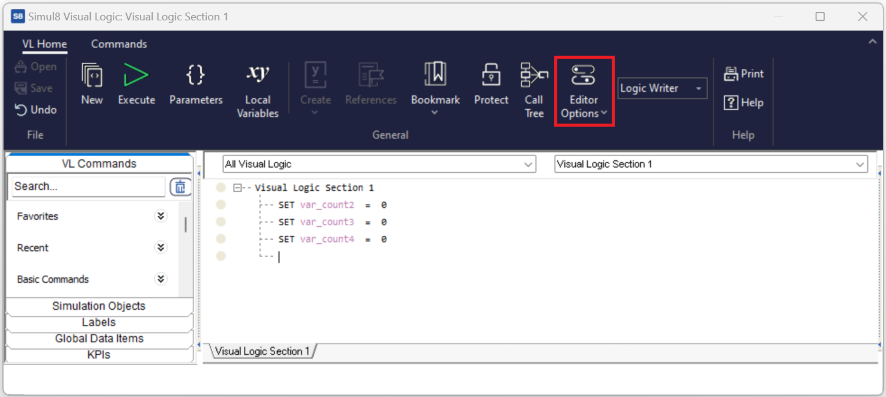
Editor Options
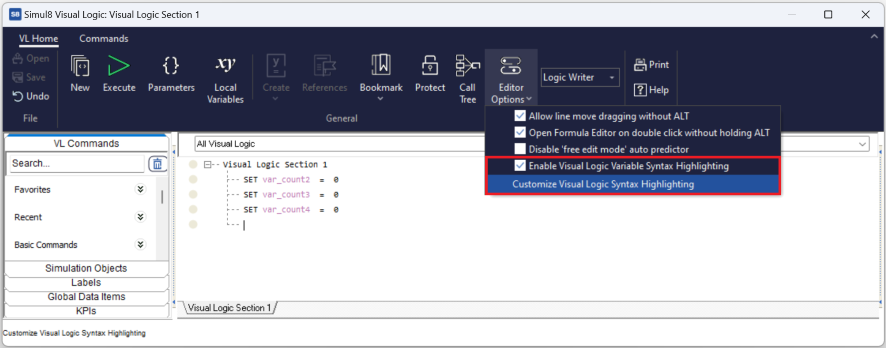
- Enable Visual Logic Syntax Highlighting:
-
By selecting this option, your Syntax Highlighting preferences will apply to all sections of Visual Logic within your simulation. Uncheck this option to return to the default view with no highlighting enabled.
- Customize Visual Logic Syntax Highlighting:
- Selecting this option will introduce a new dialog where you can specify the color coding for each variable used in Visual Logic.
Customizing your Highlighting
Use the [. . . ] button next to any variable type to browse and choose your desired color for that variable.
Use the Restore Default button to return to Simul8's original default colors for Visual Logic Syntax Highlighting.