Simul8 COM Properties
There are many benefits to using COM with Simul8, some of these include:
- An even deeper analysis of your simulation results by connecting Simul8 to Python or VBA.
- Opens up options to automatically run Models without opening Simul8.
The following presents Simul8 COM Properties, Methods and Events. This list uses Visual Basic syntax for ease of understanding. You can also find this list in a .pdf form in your Simul8 installation directory (for example, C:\ProgramFiles(x86)\SIMUL8\COMDocumentation.pdf) with the name COMDocumentation.pdf.
For instructions on how to establish the connection between a COM language and Simul8 see the VBA and COM, and the Python and COM help files.
Events
The Events can be utilized to trigger a section of code by using the specific time events such as on end run in the example below. Alternatively, the Custom Event command below can be utilized to be triggered in an event within Visual Logic code such as once a Work item of a certain Label has exited an object.
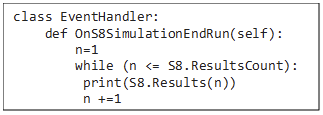
Event Commands:
Call Custom DLL
Event S8SimulationCustomEvent(TextInfo As String)
Call event on End Run
Event S8SimulationEndRun()
Call event on End Trial
Event S8SimulationEndTrial()
Call event on Simulation Open
Event S8SimulationOpened()
Executes before Simul8 closes down
Event S8SimulationReadyToClose()
Call event on Reset
Event S8SimulationReset()
Call event on Custom message open
Event S8SimulationUserMessage(Answer As Long, TextMsg As String, ValidAnswers As Long)
Class S8Simulation
This class applies to the entire Simul8 system and returns overall simulation information as seen in the Event example above.
Methods
Method includes commands that call on something within the simulation e.g. an event such as deleting Work Items. An example of this, is the code below which opens a specific simulation file.

S8Simulation Methods:
Block Current Routing
Sub BlockCurrentRouting()
CodeName is the name of a block of Visual Logic in the currently open simulation
Sub CallVL(CodeName As String)
Close the currently open simulation
Sub Close()
Copy Selected Objects
Sub CopySelectedObjects(XOffset As Long, YOffset As Long)
Delete Current Work Item
Sub DeleteCurrentWI()
Delete Selected Objects
Sub DeleteSelectedObjects()
CodeLine is a single line of Visual Logic or multiple lines separated by CRLF
Sub ExecVL(CodeLine As String)
Returns the Profit total
Sub GetProfitTotals(Cost As Single, Revenue As Single)
Link Simulation Objects
Sub LinkSimObjects(SourceObject As S8SimObject, DestObject As S8SimObject, TravelTime As Single)
Closes the currently open simulation without saving and opens FileName. This can be any file type supported in SIMUL8 File/Open.
Sub Open(FileName As String)
Schedules a return to time zero. The simulation is not actually reset until all outstanding windows events are processed. This should be your last line of code before user interaction, or, if this is not possible, call DoEvents (or equivalent) until all events are processed.
Sub ResetSim(rns As Long)
Run Simulation
Sub RunSim(endtime As Double)
Save Simulation
Sub Save(FileName As String)
Set Work Item Label value
Sub SetCurrentWILabelValue(LabelName As String, Value As Single)
Set Shift Times
Sub SetShiftTimes(ShiftName As String, startTime As Single, endtime As Single)
Set Travel Times
Sub SetTravelTime(SourceObject As S8SimObject, DestObject As S8SimObject, TravelTime As Single)
Set Work Item Image
Sub SetWIImage(ImageName As String)
Step Simulation one event
Sub StepSim()
Stop Simulation
Sub StopSim()
Run Trial
Sub TrialSim(Runs As Long, dispResults As Boolean)
Unlink Simulation Objects
Sub UnLinkSimObjects(SourceObject As S8SimObject, DestObject As S8SimObject)
Unselects objects on the Simulation window
Sub UnSelectObjects()
Name should be set to the name you want for the object, but if it is invalid it will be adjusted as the object is created.
Function CreateSimObject(Name As String, ObjType As String)
ObjType must be one of:
- 'WORK CENTER' (Activity)
- 'STORAGE' (Queue)
- 'ENTRY' (Start Point)
- 'EXIT' (End Point)
- 'CONVEYOR'
- 'TANK'
- 'PIPE'
- 'PROCESS'
- 'RESOURCE'
- 'LOADER'
- 'UDOBJECT';
Return Current Work Item Label value
Function GetCurrentWILabelValue(LabelName As String) As Single
Get a current result value from any simulation object or other type of result giving item in SIMUL8. ItemName is the name of the objects (eg "Group 1"). For Code 1 and 2 add such a result interactively to the results summary and save as XML. Inspect the XML file to see the code1 and 2 values.
Function GetResultByText(ItemName As String, Code1 As Long, Code2 As Long) As Single
Properties
S8Simulation properties can be utilized to call out simulation information such as in the Event example below.
An example is the use of the event "S8SimulationEndRun()" to call out the model results on end run using two S8Simulation object Properties to loop through the KPI list.
S8Simulation Properties:
SIMUL8's BuildNumber
Property BuildNumber As Long
read-only
Returns TRUE is the Professional version of COM is available in this SIMUL8 installation.
Property COMProfessional As Boolean
read-only
Returns the path and name of the log file being used for the Results/Detailed log. Reference this function whenever you need to open and read the file. Only immediately after it is called can you be sure it is safe the open the file for reading.
Property DetailedResultsLogFile As String
read-only
Set to false to have all user questions referred to the S8SimulationUserMessage COM event
Property DisplayUserMessages As Boolean
The path and file name of the currently open simulation.
Property FileName As String
Returns a 32bit word where each bit represents a SIMUL8 plug-in or equivalent.
Property InstalledFeatures As <Unsupported variant type>
read-only
For OEM use only
Property OEMInstalledFeatures As <Unsupported variant type>
read-only
Returns an object of type S8Result - see also ResultsCount
Property Results(Index As Long) As S8Result
read-only
Returns the count of results collected
Property ResultsCount As Long
read-only
Property GDValue(Name As String, Col As Long, Row As Long) As Single, returns TRUE if COM Warnings are enabled
Property ShowCOMWarnings As Boolean
Returns the Object's name
Property SimObject(Name As String)
read-only
Returns the number of items currently at the Object
Property SimObjectCount As Long
read-only
Returns the Index of an Object
Property SimObjects(Index As Long)
read-only
The speed of the simulation
Property SimSpeed As Long
Returns Simulation Time
Property SimulationTime As Single
Uses SolutionXML
Property SolutionXML As String
Returns the Simul8 Edition
Property Version As String
read-only
Returns the version number
Property VersionNumber As Long
read-only
States whether you can see Simul8 running or not
Property Visible As Boolean
The Warm Up Period of the simulation
Property WarmUpTime As Single
Gets the name of the simulation window
Property WindowHandle(WindowName As String) As Long
read-only
Class S8SimObject

Methods
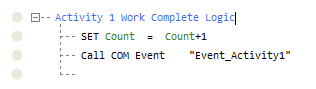
The Object Methods can be utilized to alter a set of parameters of specific simulation objects, e.g the example above within the S8SimObject Class.
S8SimObject Methods:
Add Work to Queue
Sub AddWI(position As Long, WIType As String)
BreakDown
Sub BreakDown(RestartDelay As Single)
BreakReStart
Sub BreakReStart()Sub Empty()
Empty Simulation Object
Sub Empty()
Get Object Location
Sub GetLocation(X As Single, Y As Single, WindowName As String)
Returns the Profit Total
Sub GetProfitResults(Cost As Single, Revenue As Single)
Move Work Item
Sub MoveCurrentWItoPos(position As Single)
Returns the raw data collected that SIMUL8 uses to calculate result values
Valid Result types include:
- Activities: STATES, CONTENT
- Groups: STATES, CONTENT
- Queues: DURATION, CONTENT
- Conveyors: DURATION, CONTENT
- Exit: DURATION
- Resources: CONTENT, AVAILABILITY
- Tank: CONTENT
Sub OutputRawResultsData(ResultType As String, FileName As String)
Reschedule Arrival
Sub ReScheduleArrival()
Select Simulation Object
Sub Select()
Select Current Work Item
Sub SelectWI(position As Long)
Select Work Item on Conveyor
Sub SelectWIinRegion(RegionStart As Single, RegionLength As Single)
Set Object Location
Sub SetLocation(WindowName As String, FromLeft As Long, FromTop As Long)
Set Resources Required
Sub SetResourcesRequired(ResourceType As S8SimObject, Requirement As Single)
Set Route out Percent
Sub SetRoutePercent(DestSimObject As S8SimObject, Percent As Double)
Set Shift Availability
Sub SetShiftAvailability(ShiftName As String, UnitsAvailable As Long)
TRUE if "Show" is checked
Sub TitlePosition(TitleVisible As Boolean, XOffset As Long, YOffset As Long, WrapPixels As Long)
Copy Simulation Object
Function CopySimObject()
Get Current Run Result Value
Function CurrentRunResultValue(Code1 As Long, Code2 As Long) As Single
Properties
S8Object properties can be utilized to call out simulation information of specific objects such as in the Class S8Object example above.
S8SimObject Properties:
The Queue's Capacity
Property Capacity As Single
Collect Number used for Collect Routing In
Property CollectQuantity(SourceObject As S8SimObject) As Long
Returns the Work Completed
Property Completed As Long
read-only
Returns the Current Contents
Property CountContents As Single
read-only
Returns the number of Resources held by the current Work Item
Property CountHeldByCurrentWI As Long
read-only
Returns InCount
Property CountInRoutes As Long
read-only
Returns OutCount
Property CountOutRoutes As Long
read-only
True if Object Count is visible
Property CountVisible As Boolean
Sets the Display Type of an Object. For example, a Queue could be a Static Image(0), Queue(2), Tank (3), Block (7),Graphic Tank (5), Label Block (8), Graph (6)
Property DisplayMode As Long
Set Pipe Delay which is a preference setting
Property Delay As Single
Sets the FallThroughLevel of a Tank
Property FallThroughLevel As Single
True if First at Start is enabled
Property FirstAtStart As Boolean
Fixed value for Label Batching In
Property FixedTypeLabelValue As Long
Flow rate of a Pipe
Property FlowRate As Single
TRUE if Object Image is hidden
Property HideMainImage As Boolean
TRUE if Hide Sub-objects under Component Properties> Graphics is checked
Property HideSubObjects As Boolean
TRUE if Ignore Blocked Routes on Circulate Routing out is checked
Property IgnoreBlockedRoutes As Boolean
TRUE if "Ignore hints about lost Work Items" is checked
Property IgnoreLost As Boolean
TRUE if Ignore Starved Routes on Circulate Routing out is checked
Property IgnoreStarvedRoutes As Boolean
Name of Image
Property ImageName As String
Index of Object
Property Index As Long
Start-up Quantity of a Queue
Property InitialContents As Single
Max value of Batching based on the total value of a Label
Property LabelBatchingMax As Single
Min value of Batching based on the total value of a Label
Property LabelBatchingMin As Single
Length of a Conveyor
Property Length As Single
Returns Loadspace on Conveyor
Property LoadSpace As Single
read-only
Locked in Route of the Activity
Property LockedInRoute As Long
Returns the number of Work Items lost at a Start Point
Property LostCount As Single
read-only
Max Load Quantity of a Loader
Property MaxLoadQuant As Single
Minimum Wait of a Queue
Property MinimumWaitTime As Single
Min Load Quantity of a Queue
Property MinLoadQuant As Long
Name of Object
Property Name As String
Object Output Percentage
Property OutputPercent As Single
Position of Loader along Path
Property position As Single
Priority of the Activity Property
Priority As Long
Returns ReadyTime of Conveyor
Property ReadyTime As Single
read-only
RisethroughLevel of Tank
Property RiseThroughLevel As Single
Routing out Discipline
Property RouteOutMethod As Long
Shelf Life of a Queue
Property ShelfLife As Single
Speed of a Conveyor
Property Speed As Single
Returns the State
Property State As Long
read-only
TRUE if Unlimited at Start Point is checked
Property Unlimited As Boolean
Class S8Result
This class applies to all Simul8 Results
Properties
Returns Confidence Limit from Results
Property ConfLimit(Limit As Long) As Single
read-only
Visual Logic Text Description
Property Description As String
True if the results summary item is not a result but a decision variable (see OPTIMIZ and OptQuest for SIMUL8)
Property IsDecision As Boolean
read-only
Returns average result of a trial
Property Mean As Single
read-only
Result Name (i.e. Time in System)
Property Name As String
read-only
Object from which the result comes from
Property SimObjectName As String
read-only
