OptQuest Tutorial
This tutorial will guide you through an example of how to use OptQuest. We will use the file - optquestexample.s8.
The simulation represents a cafe serving both food (made by Chefs) and drinks (made by Baristas). These are then taken to the customers by the Servers. Our aim will be to find the optimum level for each type of staff to maximize throughput while keeping the Queue to order within an acceptable level.
Both Servers and Baristas are trained to use the till and take the customers' orders. This is represented by the Pooled Resource - Till Staff. They will both prioritize making existing orders over taking new ones.
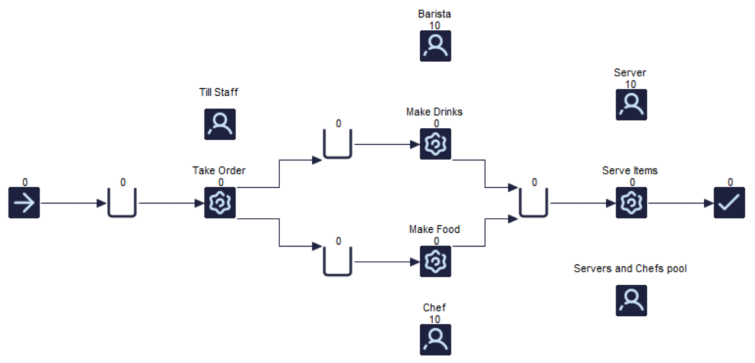
We are told that it is possible to employ between 1 and 10 staff members in each skill set but a maximum of 25 staff overall.
Getting Started with OptQuest for Simul8
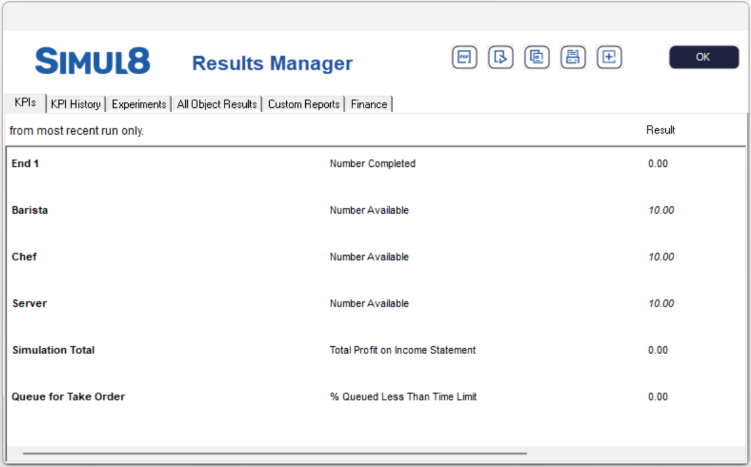
First, we need to add the relevant results to the Simul8 KPI Summary. Any results entered in the KPI Summary will be available within OptQuest and may be used as part of the decision and optimization process.
You should consider what the objective of the OptQuest trial is going to be, for example, you may want to maximize throughput or minimize queue time. Also consider what parameters you will change, for example, staff numbers.
- Work Completed at the End Point
- % Queued less than time limit for the Queue to Take Order (set to 5 minutes)
- Max Available Baristas
- Max Available Chefs
- Max Available Servers
- Total Profit on Income Statement
In the example model this has already been done for you.
From the Advanced tab, click the OptQuest button to open OptQuest for Simul8. We will then go through the 4 tabs to add our options.
Objectives
Under the Objectives tab, add the objectives to be optimized. Add the Number Completed and the % Queued Less Than Time Limit. You also need to select if each objective should be Maximized or Minimized.
- Weighted - each objective is assigned a weight and when calculating the value of the solution, each objective is multiplied by its weight.
- Goal - a multi-objective goal optimization allows you to specify the goal value for each objective in the optimization.
- Pattern Frontier - pattern frontier uses the optimization engine to find the optimal solution.
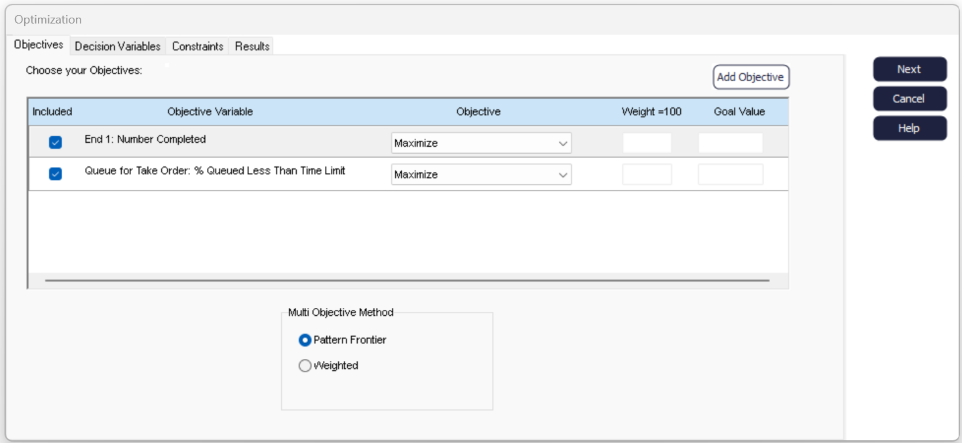
Click Next or select the Decision Variable tab.
Decision Variables
- Included - a quick way to add or remove a variable to try different scenarios.
- Variable - the name of the decision variable.
- Continuous - continuous decision variables can take on any value (including decimal numbers) between their minimum and maximum value e.g., a minimum wait time. Not selecting Continuous will only include whole numbers.
- Lower Bound - the minimum value your decision variable can take.
- Suggested Value - the value that you want to try first (optional).
- Upper Bound - the maximum value your decision variable can take.
- Step - the interval you would like the variable to increase by in each trial. This value is required for non-continuous, discrete variables.
We will add the Max Available number for the Baristas, Chefs and Servers as our variables. We have been told that we can have between 1 and 10 staff members for each work type and will increment by 1 for each trial.
These are all discrete variables (we cannot have a fraction of a staff member) so we will not tick continuous, and we will leave the suggested value blank.
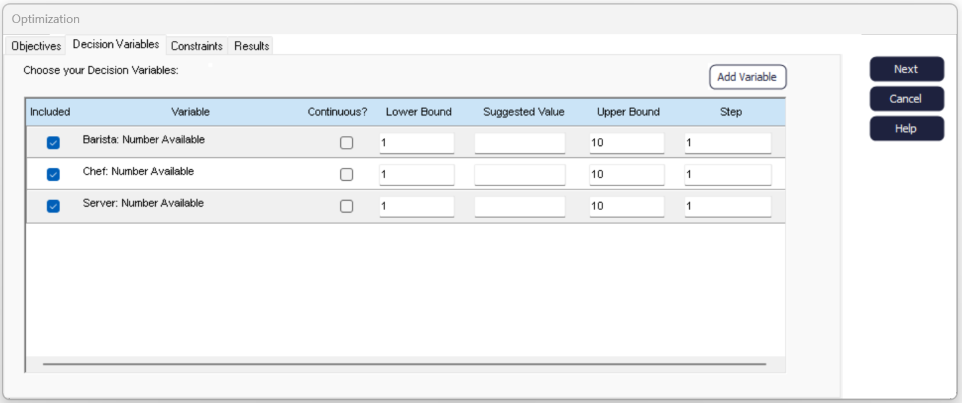
Click Next or select the Constraints tab.
Constraints
The constraints tab allows us to add more complex constraints on the system.
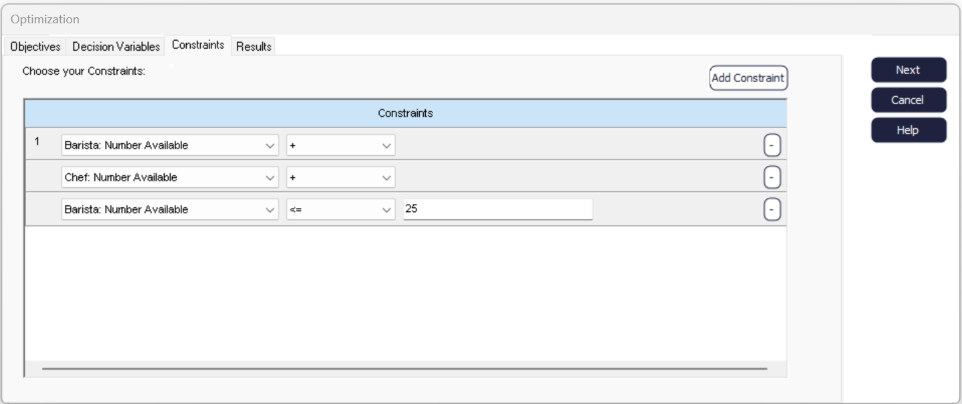
Finally, click Next or select the Results tab.
Results
Note
The number of runs in a trial can be set by going to Home tab and choosing .
In this window, you can also set a name for the spreadsheet that will contain your results. If you do not enter anything in this box, Simul8 will create a new sheet called Optimization - note, this sheet will be overwritten if OptQuest is run again. You can avoid this by entering the name of a new spreadsheet to print the results to.
Now click Optimize - OptQuest will run for the specified time, or number of trials you entered. It will identify the best solution from these runs and record the parameters used to achieve this result.
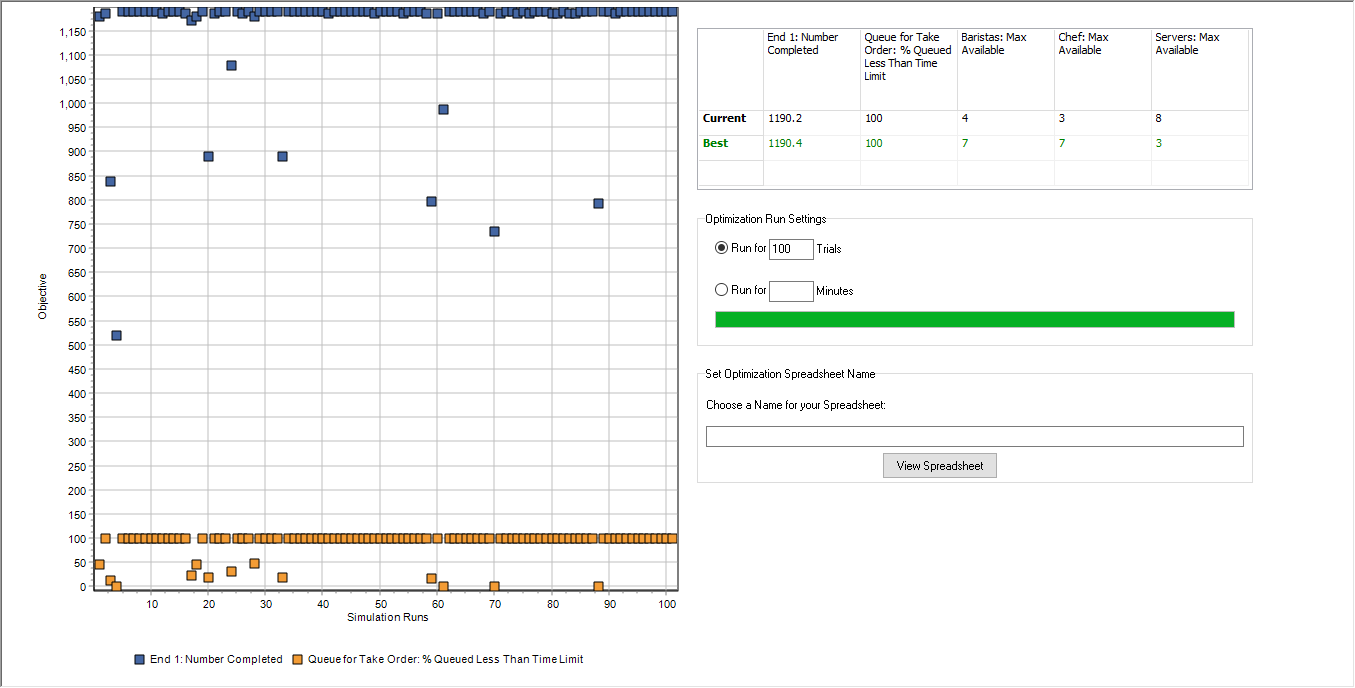
We can see that the best solution results in 1190.4 completed orders with 100% of customers queueing less than 5 minutes. The trial results are the average across the number of runs in that trial, which is why the number completed will not always be a whole number.
Checking the results window, or looking at the spreadsheet, shows this was achieved with 7 Baristas, 7 Chefs and 3 Servers - a total of 17 staff. Without the power of Simul8 and OptQuest we may have employed 25 staff and still made the same number of sales because of other constraints in the system.
Expanding Our Optimization
The example so far concentrated on maximizing the number of orders. This may be relevant in some models - manufacturing, for example - but the manager of the cafe has now asked how to maximize profit.
Employing more staff comes at a cost. This cost is not worth paying if the extra staff do not bring in at least the same amount of extra income. Can we account for this in our model? Yes - using Simul8's built in Profit and Loss feature.
The cafe manager has told us they make an average of $20 per order. Servers and Baristas have a fixed cost of $600 per week per staff member. Chefs earn a higher wage of $800 per staff member. These details have already been set up and added to the KPI manager in the example simulation.
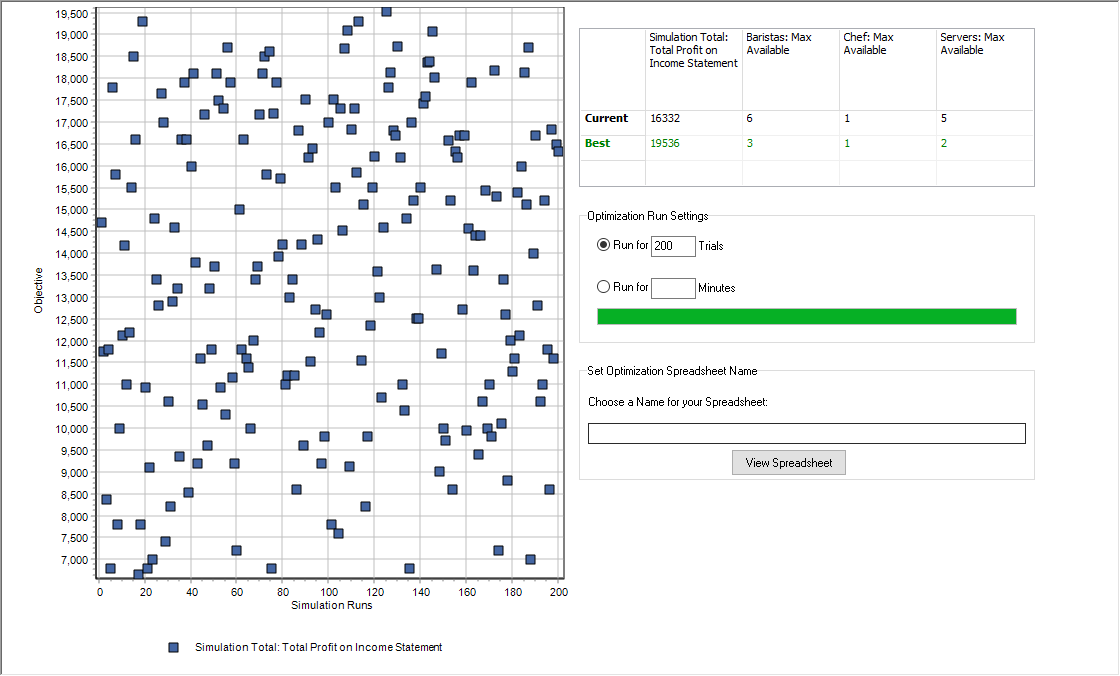
Combining simulation and optimization quickly shows that the best chance of making the highest profit is to have 3 Baristas, 1 Chef and 2 Servers. The expected profit is just over $19,500 per week.
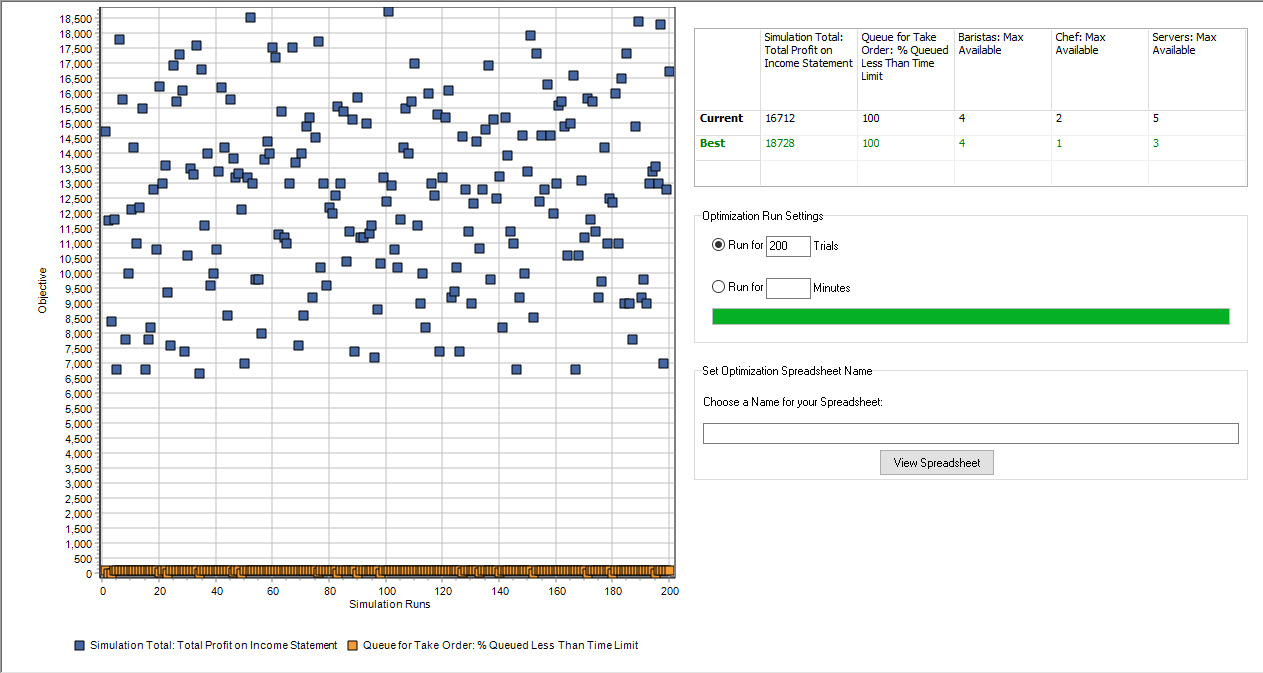
Now, with 4 Baristas, 1 Chef and 3 Servers, we can still expect to make just over $18,700 with 100% of customers queue time within the acceptable limit.
